
Monthly Archives: September 2010

Where Do You Rank In LinkedIn’s Search Results?

LinkedIn_Why_Join_LinkedIn2 from www.linkedin.com Have you ever wondered where you rank in the search results when other people search for you or people like you in LinkedIn?

Have you ever searched for yourself on LinkedIn?

Do you know here you rank in the results?

From my research and observations, most of what the LinkedIn experts and gurus advise with regard to LinkedIn profile optimization may be wrong. In fact, some of the things people are doing on LinkedIn in an attempt to positively affect their search ranking may have a dramatically opposite effect!

Let me show you what I’ve found.

What Happens When You Search for Yourself on LinkedIn?

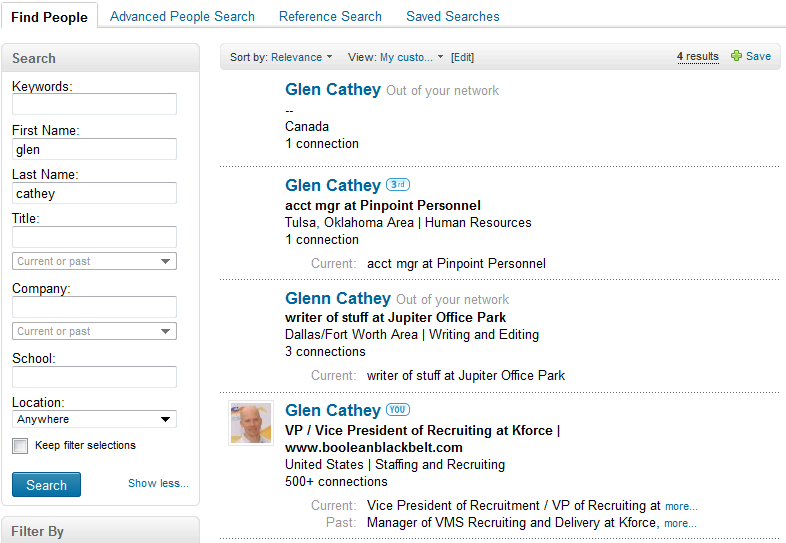
When I search for myself, this is what I get:
LinkedIn_Glen_Cathey_Relevance

I wasn’t sure exactly what to expect, but something told me I should be #1. Instead, I am the last on the list of results sorted by relevance, after people who aren’t even in my network.

None of the profiles, including my own, mention my name more than once.

Then I decided I would try searching for my name in the keywords field to see what would happen. The results are the same – I am dead last, and the top 2 results are people who have only 1 connection. The third result isn’t even spelled the exact way I searched for it, and it’s still ranked higher than me.

Does this happen to everyone who searches for themselves? Does LinkedIn always rank you last in your own search?

What happens when you search for yourself by first and last name in LinkedIn? Is your experience any different?

LinkedIn’s Answer to Search Result Ranking

To get to the bottom of this mystery, I thought I’d try checking into LinkedIn’s searchable customer support center. I’m not sure how many other people have really delved into all that is available there.

Surprisingly, it turns out they have an answer to the question of why my profile doesn’t rank at the top of LinkedIn search results. I suggest you read very carefully. Continue reading
LinkedIn Demographics and Visitor Statistics

LinkedIn_Quantcast_Daily_Visits
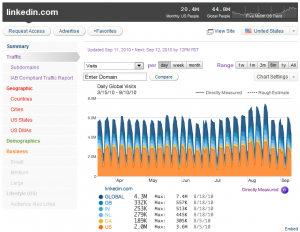
If you have ever been curious about LinkedIn’s demographics, as well as LinkedIn’s visitor statistics broken down by country, city, and state, you’ve come to the right place! A while ago I stumbled across a very interesting and powerful website called Quantcast, which is used by 9 of the top 10 media agencies because they quite accurately quantify Internet audiences.

While some sites are not directly measured and only have estimated data at this time (such as Facebook and Twitter), LinkedIn is fully “quantified.” In other words, Quantcast directly measures LinkedIn’s visitors – which gives us some very interesting insights.

LinkedIn_Quantcast_Directly_Measured_Data Continue reading

Bing Beats Google for the Best Way to X-Ray Search LinkedIn

Bing vs Google11/13/11 Note: I’ve provided some updated LinkedIn X-Ray search string syntax examples at the end of this post.

I recently received a message via LinkedIn from Gary Cozin, an accomplished, well known player and knowledge sharer in sourcing circles, asking me a question:

“You know when we xray Google for LI profiles we can insert “current * financial advisor” in our string to bring back ‘current’ job titles we want. Do you know how would that be done in Bing?

Now, I have been a long-time user of Google for X-Ray searching LinkedIn. However, Google’s recently made some changes to the way LinkedIn X-Ray search results are returned that has made sourcers and recruiters add additional terms to X-Ray strings to an already lengthy search string to return only profiles (e.g., -inurl:dir, -inurl:jobs…).

Not long after Google made those changes, Shally Steckerl posted an article detailing a novel approach to X-Ray searching LinkedIn using the phrase “Public profile powered by,” which seemed to allow searchers to not have to resort to the cumbersome (inurl:in OR inurl:pub) -intitle:directory -inurl:dir -inurl:jobs, etc. search syntax.

While that approach definitely works, Irina Shamaeva and I have found it doesn’t seem to find and return all available results. Even so, there is no denying that it is a much simpler (and shorter!) method for finding LinkedIn profiles via Internet search engines. Why unnecessarily over-complicate search strings?

So, with Google’s recent changes coupled with their annoyingly overzealous blocking of more complex searches (in some cases you don’t even get a chance to use a CAPTCHA to prove you’re human!), I was happy and curious to see if there was in fact a way to accomplish what Gary was looking to do using a search engine other than Google. Continue reading

How to Automatically Build Boolean OR Strings

Writing Boolean search strings is typically a quick and simple affair, as most search engines and databases won’t let you construct anything longer than a few hundred characters.

However, if you’re not constrained to a fixed limit on search terms (such as Google’s 32 words) or characters, it’s no longer a simple matter of “this OR that.”

I wrote an article not too long ago in which I illustrated some of the serious limitations associated with using industry filters when searching LinkedIn (or any site, for that matter) for people with specific industry experience. In that post, I demonstrated that when accessing LinkedIn with a free account, there are no search string length limits, allowing you to enter long OR statements with 100’s of companies.

Building large OR strings can be very tedious and time consuming work. Thankfully, John Turnberg graciously commented on my article (thank you John!) and detailed how to use Excel to make quick work of creating large OR strings.

I am not an Excel wizard by any means, so it may have taken me longer than most to take John’s Excel advice and get it to work. If you’re not handy with Excel and would like a turn-key solution, I’ve saved you the effort of trying to build it yourself – you can download a basic Excel Boolean OR builder here: Continue reading