Boolean Black Belt

Leveraging social networks, resume databases, and the Internet for sourcing and recruiting

  • FREE Sourcing + Recruiting Resources
  • Who is the Boolean Black Belt?
  • Contact Me
  • Copyright, Disclaimer, Photos

Subscribe via Email

adobe illustrator cs serials Buy Adobe Illustrator CS5 for Mac OEM - Online Software Downloads Center illustrator brushes adobe photoshop adobe Buy Adobe Illustrator CS5 OEM - Online Software Downloads Center free tutorial aging picture adobe photoshop adobe cs2 free illustrator trial Buy Adobe Creative Suite 5 Master Collection OEM - Online Software Downloads Center adobe illustrator cs 11 serial free adobe illustrator cs key Buy Adobe Flash Professional CS5 for Mac OEM - Online Software Downloads Center adobe cs2 indesign personal seminar started adobe illustrator 10 mac Buy Adobe Flash Professional CS5 OEM - Online Software Downloads Center adobe indesign free download adobe illustrator envelope no 10 Buy Adobe Photoshop CS5 Extended for Mac OEM - Online Software Downloads Center fonts adobe indesign adobe photoshop cs2 prefence settings Buy Adobe Dreamweaver CS5 for Mac OEM - Online Software Downloads Center adobe photoshop animals free 2007 adobe photoshop program Buy Adobe InDesign CS5 for Mac OEM - Online Software Downloads Center adobe photoshop keys import corel draw into adobe illustrator Buy Adobe InDesign CS5 OEM - Online Software Downloads Center adobe books illustrator academic version of dreamweaver adobe Buy Adobe Creative Suite 5 Master Collection for Mac OEM - Online Software Downloads Center adobe photoshop freezes adobe photoshop element 5 0 Buy Adobe Dreamweaver CS5 OEM - Online Software Downloads Center adobe photoshop save photo without background loading font in adobe photoshop Buy Adobe Photoshop CS5 Extended OEM - Online Software Downloads Center adobe photoshop cs3 torrent torrentspy

LinkedIn Shows New Search Options, Some No Longer Free

Posted at June 21, 2010

LinkedIn_P1LinkedIn now shows some new search functionality to the masses who use LinkedIn for free. Perhaps of greater interest, some previously free search options are now premium filters.

I first noticed the changes to LinkedIn’s advanced search page on Saturday, June 19th. Did they appear earlier and I just didn’t notice them? Perhaps I missed a press release?

For those of us without a premium LinkedIn account, the advanced people search interface used to look something like this:
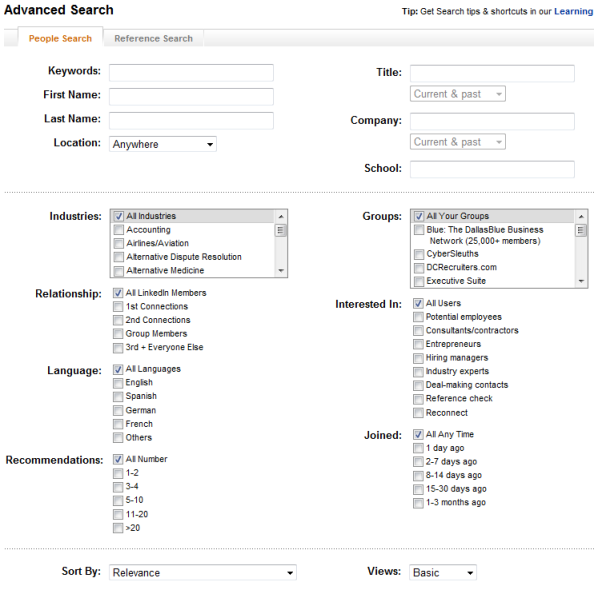
LinkedIn_Dynamic_Search_Refinements 600 

Now it looks like this:

LinkedIn_New_Search_Interface3

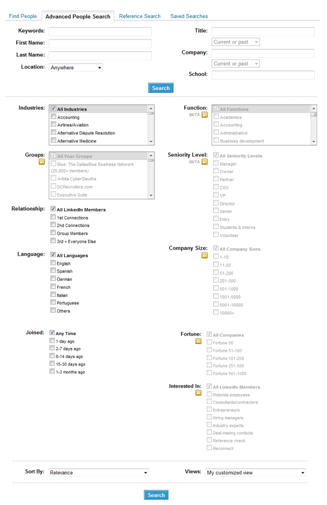
What’s New

While premium account holders have had access to these filters for some time now, the new search options visible to everyone now include sorting results by Function, Seniority Level, and Fortune (50 to 1000).
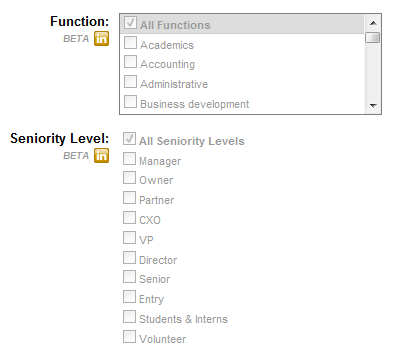
 LinkedIn_P2LinkedIn_P3

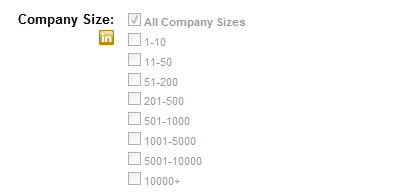
You can also sort by Company Size:

LinkedIn_P7

You won’t be able to take advantage of those search options without upgrading your LinkedIn account.

What’s No Longer Free

Previously, you did not need an upgraded account to search for people and choose to filter your results by Group and “Interested In.” 
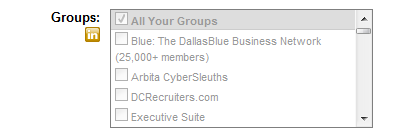
 LinkedIn_P6

LinkedIn_P8

If you don’t currently pay for LinkedIn and you click on these search filters from the advanced search interface, you’ll get a pop up window like this:

LinkedIn_P9_Premium_Filters

Although previously free, they are now premium filters, so you have to pay to play with them. 

Or do you?

After you execute a search, if you expand the Groups search filter, you will notice that you can type in the “Enter group name” field. 
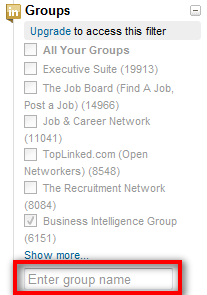
LinkedIn_P12

 If you begin typing, LinkedIn will show you available options, and you can in fact use the filter to sort by group.
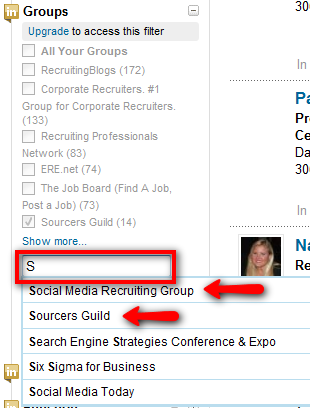
LinkedIn_P10_Groups

Interesting, yes? Give it a try.

You can also search within LinkedIn Groups the old-fashioned way – by going to Groups, selecting one, and searching within it. You can even click “Advanced Search” and the group you’re searching will be highlighted in the Groups list of the Advanced Search Interface.
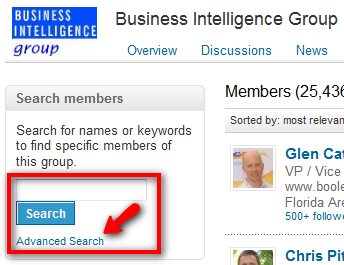
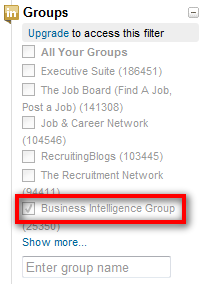
LinkedIn_P18

LinkedIn_P19

As for filtering results by “Interested In,” I’d like to remind you about LinkedIn’s Advanced Search operators. I wrote about them in January 2009, but I don’t know many people who make use of them. However, if you want to be able to sort your search results by “Interested In” without upgrading your account, you’ll want to get to know them.

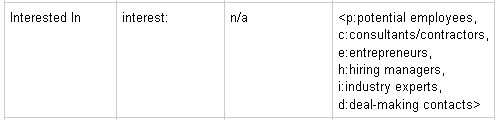
You can use the interest: operator to search LinkedIn and find people who have specified a particular interest – at least 1 of the 6 listed in this chart:
LinkedIn_P13

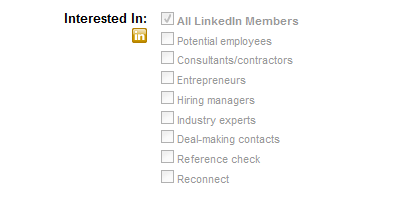
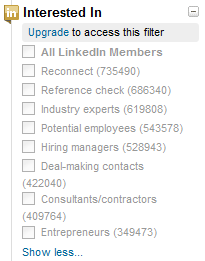
If you expand LinkedIn’s “Interested In” filter on the left rail, you’ll notice a total of 8 interests (see below), whereas the LinkedIn Advanced Search Operator Chart above only lists 6. 
LinkedIn_P15

While it wasn’t difficult to figure out that r = Reconnect, I haven’t yet figured out what = Reference check (if anything). Let me know if you do.

You can run a simple search such as this one using the interest: operator and successfully return results with the specified interest:

ccompany:cisco ctitle:engineer interest:p

LinkedIn_P14

If you mouse over the search results, you can see the interest is configured into the search:
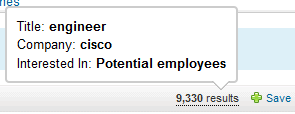
LinkedIn P16

You can also see that it works by looking on the left rail:
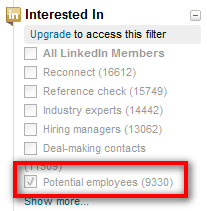
LinkedIn_P17

What the Future Holds

LinkedIn’s new filters are handy – they can definitely help a person quickly and easily refine their search results. I’m sure that more people and organizations will gladly pay to be able to utilize these search features, especially now that they are dangled in front of everyone who is currently using LinkedIn for free.

Charging for more advanced search options makes sense - LinkedIn is a business and they need to make money. I just hope that LinkedIn doesn’t continue the trend of taking free search options and converting them to premium filters.

I’m pretty sure some folks at LinkedIn will end up seeing this post, so don’t expect the Group and “Interested In” search tricks I revealed to last very long.

LinkedIn – you’re welcome for the free user/functionality testing. Can I at least get some LinkedIn schwag, or an honorary upgraded account? 

:-)

LinkedIn
  • Digg
  • Stumbleupon
  • Delicious
  • Reddit
  • Technorati

If you enjoyed this post, please consider to leave a comment or subscribe to the feed and get future articles delivered to your feed reader.

Comments

21 Responses to “LinkedIn Shows New Search Options, Some No Longer Free”
  • Steve Levy says:
    at

    G, nice job. There will always be workarounds; that’s how “we” started thus Internet sourcing thing.

  • Caryn says:
    at

    Thanks for the helpful updates. It seems you can also search in your groups without upgrading by using the Relationhips filter, where you can choose to search Group Members.

  • Ruth-Dinaz Sarkari says:
    at

    Outstanding and timely as usual Glen! Thank you for being on the ball with LI!!

  • David Perron says:
    at

    x covers the reference check
    ccompany:cisco ctitle:engineer interest:x

  • Boolean Black Belt says:
    at

    @ Steve and Ruth – thanks!

    @Caryn – thank you for the suggestion! While the method you raised does allow you to choose to isolate and search your group connections, there is a limitation in that you aren’t able to target specific groups in this manner. :-(

    @David – nice pickup on the interest:x, well done!

  • M L Castellanos says:
    at

    Yep. You didn’t notice them. Another free filter that is gone is the ability to do the automatic job search. Previously, one had the ability to create filters using certain criteria to create a custom job search(es). Once created, it could be an application on the home page.

    I think taking this one away will actually hurt LinkedIn. Job search is a numbers game for both sides. If the paying job poster doesn’t receive a certain amount of interest/applications, they will conclude the cost to advertise may not be worth it.

    Good and timely post.

  • Irina Shamaeva says:
    at

    There’s a simple hack that gives basic members access to the premium search filters. Find a friend with a business account, pick your search, copy the URL and reuse. It works just fine.

    Someone who is an enthusiastic hacker can probably create a table of substrings that need to be used in the URLs, per field and per each of its options.

    Here’s a screenshot.
    http://booleanstrings.wordpress.com/2010/06/22/linkedin-search-filter-options-for-a-basic-user/

  • Norma Beasant says:
    at

    Glen,

    Let us know if LinkedIn does give you an honorary upgraded account.

  • Geri Kleeman says:
    at

    Maureen – Thanks so much – very interesting – I hadn’t even noticed the changes yet.

  • Matt Kerr says:
    at

    Glen,

    I have a paid $49.99 per month account and noticed these changes as well. Your prediction came true. LinkedIn ended up seeing this post, the Group search trick you revealed no longer works.

    Interestingly, in trying to find LinkedIn group members that belong to “Steel Experts” group in the Cleveland, Ohio area – I ran the following search on LinkedIn:
    Location: 50 mile radius of zip 44146 (Cleveland area)
    Looked at Relationships – checked box next to Group Members (48)

    Looked at Industry. First Industry in list is “Metals and Mining” (48).

    Looks like Linkedin picked up all Steel Expert members in metals and mining in Cleveland. I probably just got lucky using the industry check box. I don’t often utilize the industry tabs because people use them inconsistently but this seemed to work.

    Thanks for your great posts.

    Matt Kerr
    Grant Alexander

  • Boolean Black Belt says:
    at

    @Matt – thanks for commenting and sharing your finding with the Steel Experts/Metals and Mining group/industry search. Like, you – I don’t often use industry filters because I find that many people choose a different industry other than what most people would assume the company they work for would be categorized as. I have an upcoming post that should give you another angle to take to solve that issue. :-)

  • Tiffany says:
    at

    My biggest problem with this was that you could no longer see last names of those that are in the same group as you. While I could go around it, using boolean and google to figure out the full names, this was getting time consuming for the 100+ names I used to be able to source within 2 hours. Because we use LinkedIn a great deal, we decided to upgrade believing that the new talent level enabled us to search within groups, thus seeing these names. I couldn’t fault LinkedIn too much, and the extra $50/month was worth it for the alternative. But nope, no go. It’s still first name and last initial. Sure we can still send messages, but the only way to track candidates will be through their system, until someone gives us a full name. We like to track our metrics for our searches so this is frustrating on a numbers level and on a candidate tracking level. Since my advanced LinkedIn searches still yield individuals in my groups, I’m planning to downgrade back to the $49.99/month soon.

  • Tiffany says:
    at

    I should add that I know LinkedIn allows members to change so that only their first name and last initial is shown, but this was happening to every member within a group within my list of 500 names, so I’m pretty sure this is one of the new changes.

  • Boolean Black Belt says:
    at

    @Tiffany – thank you for sharing your experience and insight! Until you mentioned it, I had never really taken notice that some people don’t use their full names in groups – I had to go check. I didn’t encounter too many people who used only their first name and last initial, but that may simply be due to the groups I checked. Can you share a group that seems to have a large # of people who don’t use their full names? I’d like to poke around a bit.

  • Tiffany says:
    at

    @Boolean Black Belt I’m embarrassed to say I did some further due diligence with my colleague’s accounts, and they do not have the same problem. For me, every single person that I share a group with, not a connection, only shows their last initial. It might be a glitch with my account? I’m not sure. I can’t find examples of this happening anywhere else. I’ve sent a message to LinkedIn support, but I’m doubtful I’ll hear back. Any ideas what could be going on?

  • Thomas says:
    at

    The issue with lastnames coming up happened to one of my colleagues too. He is the only one paying for linkedin, the “cheapest” option… All his searched ends up with last names ending with an initial. Our searches, however, are fine, and we are basic users that pay nothing…

  • Tiffany says:
    at

    @Thomas

    On a site I went to to get a customer service number (and of course my call never was returned), I noticed someone in the comments had a similar problem. The comment was not detailed enough for me to determine, but it seems as though it is something they are beta testing. I’m not sure if it was do to my complaint (guessing not, but who knows), or the end of this beta testing, but mine is back to normal, albeit 2 weeks later.

  • Boolean Black Belt says:
    at

    @ Thomas and Tiffany – I’ve seen a number of people talking about LinkedIn search results coming up with only last initials, but I have yet to experience it myself and I search LinkedIn quite heavily. Did this phenomenon happen with all results? Was it dependent on degree of connection? If you clicked on a result, did it then reveal the full name? Did you happen to get any screen shots? Very curious about this and would like to know if it’s still happening for anyone today.

  • Thomas says:
    at

    I just checked with my colleague, and it seem that right now it affects all 3rd level connections. I don’t remember how it was last week. If you then open the profile of this person you still can’t see the last names. I did, however, find that there is a workaround for this. Simply open the same profiles directly, logged in as another user.

  • Tiffany says:
    at

    @Boolean Black Belt

    At first it was only individuals that shared a group with me. I was able to work around that by going to the group they shared with me and searching by first name (since I have the talent level where I can search within groups), however that, as you can imagine, was quite tedious. Then, it expanded to 3rd connections as Thomas mentioned. When I would open the profile, as he said, I would still only have the last initial. If I wanted to send an InMail or message, I still had only the last initial. This would be fine, except, as you know, you want to be able to track your calls/contacts, etc. As far as I can surmise, it seems like they’re beta testing this on poor, unsuspecting users. I should have gotten a screen shot, but did not. Essentially when I would have a list of search results anything past a 1st or 2nd degree result in the list, in the profile, etc, would come up with just the last initial. If I had a real problem with it, I just typically did a google boolean string to find out. I had the problem for about 2-3 weeks. Unfortunately they were the 2-3 weeks where LinkedIn was the ideal sourcing location for the positions I had.

Leave Comment

Click here to cancel reply.


About Me

I have significant experience with and passion for leveraging technology and Lean principles to achieve high quality hires in a Just-In-Time manner. I'm a power user of Social Media, ATS and CRM applications, job board resume databases, the Internet, Boolean queries and semantic search for recruiting.

My LinkedIn profile Follow me on Twitter Find me on Facebook SlideShare presentations


Search

Archives

  • August 2010
  • July 2010
  • June 2010
  • May 2010
  • April 2010
  • March 2010
  • February 2010
  • January 2010
  • December 2009
  • November 2009
  • October 2009
  • September 2009
  • August 2009
  • July 2009
  • June 2009
  • May 2009
  • April 2009
  • March 2009
  • February 2009
  • January 2009
  • December 2008
  • November 2008
  • October 2008

Categories

  • Aggregators
  • Analytics
  • Applicant Tracking Systems (ATS)
  • Artificial Intelligence Matching
  • Best Practices
  • Boolean
  • Boolean 101
  • Boolean Logic
  • Boolean Search Tips and Tricks
  • Candidate Pipelining
  • Candidate Quality
  • Cold Calling
  • Conferences
  • Copyright Info
  • Diversity Sourcing
  • Events
  • Exalead
  • Extended Boolean
  • Facebook
  • Google
  • Hidden Talent Pools
  • How-To's
  • Human Capital Data
  • Industry Searching
  • Internet Sourcing
  • Jigsaw
  • Job Boards
  • Job Posting
  • Job Search
  • Lean/JIT Recruiting
  • LinkedIn
  • Mistakes
  • Monster
  • Monster vs. Google
  • Myths and Misconceptions
  • NEAR Operator
  • Passive Candidates
  • Passive Sourcing and Recruiting
  • Proximity Searching
  • Recruiting Technology
  • Relationship Building
  • Resume Aggregators
  • Resume Sourcing
  • Resume Sourcing vs. Cold Calling
  • Resume Writing
  • Search Process
  • Semantic Search
  • Social Media
  • Social Networking
  • Social Recruiting
  • SourceCon
  • Sourcing and Recruiting
  • Sourcing Automation
  • Sourcing in Europe
  • Sourcing Mistakes
  • Spoke
  • Talent Intelligence
  • Talent Mining
  • Talent Warehouse
  • Thank you!
  • Traffic Data
  • Training Sourcers and Recruiters
  • Twitter
  • Uncategorized
  • x-ray search
  • Yahoo
  • ZoomInfo


  • Recent Posts

    • Boolean Black Belt Website Visitor Analytics
    • Private and Out of Network Search Results on LinkedIn
    • Anti-Social Recruiting
    • Denver Colorado Recruiting Conference August 25th
    • Recruiting is a Matter of Perspective
  • Twitter

    • I'm at Grand Hampton Clubhouse. http://4sq.com/c6C5Cn 2 days ago
    • Wish people showed more respect for truckers on the road - they quite literally are the cornerstone of our economy! 3 days ago
    • I'm at Kforce, Inc. (1001 East Palm AVE, Tampa). http://4sq.com/bqKYmW 3 days ago
    • More updates...

    Posting tweet...

    Powered by Twitter Tools

  • Recent Comments

    • Matt Kerr: I like using the Concatenate function on excel to combine th...
    • fraggy: got it john - i did =H$2&B2&H$2 in column d and =D...
    • John: replace the "" (the double ") with H2&" H2 is the cel...
    • Steve Cherry: Spot on - Latin may be the mother tongue of modern language,...
    • fraggy: John, I tried your formula and am getting an error - spec...


  • Links

    • Boolean Strings (LinkedIn) - Group for Sourcers, Recruiters, Sales and other professionals who are interested in Searching the web to gather information for business.
    • Boolean Strings Network - A web sourcing community sharing best practices for leveraging Boolean search strings
    • Cloud Recruiting - Expose yourself to the cutting edge of mobile recruiting
    • Magic Method - A place to learn about telephone names sourcing.
    • Recruiting Pulse - Your single source for all things recruiting – aggregator of over 40 sourcing, recruiting and HR blogs
    • Sourcing Talent - Insightful Secrets, Tips, and Tricks to finding Talent on the web
    • The Recruiters Lounge - Written by Jim Stroud (and friends) and explores the wacky world of employment with articles, podcasts, videos, comics and more.
    • TheSourceress - Grandmaster Sourcer Katharine Robinson’s blog

Powered by Wordpress | WP Premium theme by PSD to XHTML
Copyright 2010 Boolean Black Belt. All rights reserved

  • FREE Sourcing + Recruiting Resources
  • Who is the Boolean Black Belt?
  • Contact Me
  • Copyright, Disclaimer, Photos