
Boolean Black Belt

Leveraging social networks, resume databases, and the Internet for sourcing and recruiting

  • FREE Sourcing + Recruiting Resources
  • Who is the Boolean Black Belt?
  • Contact Me
  • Copyright, Disclaimer, Photos

Subscribe via Email

adobe illustrator cs serials Buy Adobe Illustrator CS5 for Mac OEM - Online Software Downloads Center illustrator brushes adobe photoshop adobe Buy Adobe Illustrator CS5 OEM - Online Software Downloads Center free tutorial aging picture adobe photoshop adobe cs2 free illustrator trial Buy Adobe Creative Suite 5 Master Collection OEM - Online Software Downloads Center adobe illustrator cs 11 serial free adobe illustrator cs key Buy Adobe Flash Professional CS5 for Mac OEM - Online Software Downloads Center adobe cs2 indesign personal seminar started adobe illustrator 10 mac Buy Adobe Flash Professional CS5 OEM - Online Software Downloads Center adobe indesign free download adobe illustrator envelope no 10 Buy Adobe Photoshop CS5 Extended for Mac OEM - Online Software Downloads Center fonts adobe indesign adobe photoshop cs2 prefence settings Buy Adobe Dreamweaver CS5 for Mac OEM - Online Software Downloads Center adobe photoshop animals free 2007 adobe photoshop program Buy Adobe InDesign CS5 for Mac OEM - Online Software Downloads Center adobe photoshop keys import corel draw into adobe illustrator Buy Adobe InDesign CS5 OEM - Online Software Downloads Center adobe books illustrator academic version of dreamweaver adobe Buy Adobe Creative Suite 5 Master Collection for Mac OEM - Online Software Downloads Center adobe photoshop freezes adobe photoshop element 5 0 Buy Adobe Dreamweaver CS5 OEM - Online Software Downloads Center adobe photoshop save photo without background loading font in adobe photoshop Buy Adobe Photoshop CS5 Extended OEM - Online Software Downloads Center adobe photoshop cs3 torrent torrentspy

What to do if Google Thinks You’re Not Human

Posted at May 24, 2010

Google_I'm_Human!Have you ever been searching the Internet with Google to find resumes or LinkedIn profiles, and instead of getting your search results, you get a nice apology from Google saying that your computer or network might be sending automated queries and can’t process your request?

In the past week alone I have received a number of inquiries from curious sourcers and recruiters as to what to do about this.

Typically, this notice is accompanied by a CAPTCHA that will allow you to enter some characters to prove that you’re human.

You are human, right?
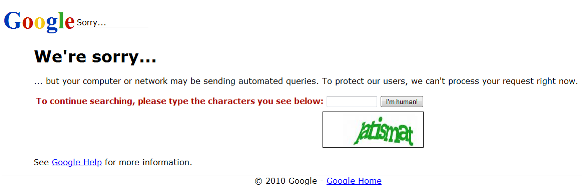
Google_Sorry_600

Performing a lot of X-Ray searches of LinkedIn profiles seems to trigger Google to ask me for proof of humanity.

However, just the other day I was searching for resumes online, and when I clicked to see the “cached” version of a search result, I got a different Google apology. This one didn’t even allow me to prove my humanity. Dang!

While Google's sorry, they won't always allow you the opportunity  to actually prove you're human and get your search results

If you choose to click on “Google Help“, you’ll see that they advise you to #1 Check for malware on your computer, #2 Contact your network administrator, and #3 If the problem persists, have your network administrator contact Google.

Apparently, sending automated queries of any sort to Google is against their Terms of Service, which states that among other things, it is unacceptable to use software to Google to determine how a website or webpage ranks on Google for various queries, ‘Meta-searching’ Google, and performing ‘offline’ searches on Google.

Last time I checked, manually searching for resumes and LinkedIn profiles isn’t any of the above.

What To Do

Because I get stopped by Google’s CAPTCHA quite frequently, I did actually contact Google, inasmuch as you can contact Google by filling out their form. Not sure if anything came of that as I have never heard back (not that I was expecting to).

However, what I have found is that simply clearing my browser’s cookies gets this annoying search result interruption to go away, at least for a while. You can be selective in clearing specific cookies or you can delete them all – which will remove your saved settings for sites you’ve previously visited. Small price to pay in order to get your search results from Google.

I hope that helps you if you ever got blocked by Google. Let me know if you have any other suggestions/fixes for this issue.

Thanks!

Google
  • Digg
  • Stumbleupon
  • Delicious
  • Reddit
  • Technorati

If you enjoyed this post, please consider to leave a comment or subscribe to the feed and get future articles delivered to your feed reader.

Comments

16 Responses to “What to do if Google Thinks You’re Not Human”
  • Lori Freeman says:
    at

    Glen,
    I thought I’d check out Twitter for a few minutes since I was unable to search on Google anymore because THIS JUST HAPPENED TO ME FIVE SECONDS AGO. How weird is that? And, as usual, your solution worked perfectly. Thanks!

  • Jung Kim says:
    at

    Another thing you can do in addition to clearing your browser’s cookies is to download the autopager FireFox add-on tool, which automatically loads next pages when you reach the end of a page.

    If you click on the next sequential number or “Next” link, you will get the “We’re sorry….” page.

  • Irina Shamaeva says:
    at

    Hi Glen,

    Thanks for posting! This has become a *big* issue in the last 4-6 weeks or so. Fellow members of “Boolean Strings” describe the issue happening as soon as they start running advanced queries – be that using the asterisk, operators, or setting the number of results to 100 per page. Use Autopager or Fastest Chrome for a few minutes, and you are blocked. What a shame.

    Irina

  • Ollezaza says:
    at

    If it’s a simple matter of clearing the cache, there are Firefox add-ons that let you “reboot” (i.e. restart automatically) the browser with options for clearing the cache, cookies and other settings.

    Just search https://addons.mozilla.org/ for “restart firefox”

  • Collins Denny says:
    at

    Glen, this happened to me a few times recently. I noticed though, the only occurrences were when I was running back to back search variations of each other, one after another to get the desired results.

    I came up with several of my own fixes, though effect is similar to yours of clearing cache.

    1. Switch browsers. If using Firefox, move to IE or Chrome
    2. If using Firefox, create a couple of spare profiles for such an inconvenience. “Firefox.exe -p” runs the profile editor. Easy to create additional profile such as one named “Profile2″. Run second profile with “Firefox.exe -p “profile2″. In the future, the second profile is always there and available should the need arise.

    Give it a little time and the problem goes away and you can return to the original browser that Google though was not a real person.

    I like Ollezaza’s comment as well. May have to download that add-on

  • Chris Havrilla says:
    at

    I have gotten this so often lately…and only recently have gotten the CAPTCHA’s – thank goodness. I have just been switching to IE or Chrome. I have gotten blocked doing everything from X-ray searches of LI profiles to the advanced string or back to back variations mentioned above. This has been driving me nuts so I am mildly comforted that I am not alone :)

    Thanks for raising the issue!! I surely appreciate the suggestions made by all — I will be sure to monitor your post to see if more come in :)

  • Boolean Black Belt says:
    at

    Thank you to everyone who has responded thus far and for the added suggestions! I did try reconfiguring FF’s options/settings, but I switched back. I’ve found that simply deleting your temporary Internet files will also do the trick most of the time, even if you don’t clear your cookies (which can be annoying to lose saved data). I’ve never switched browsers because I refuse to let Google force me to change my behavior – they are clearly being overzealous if simply searching for resumes and even clicking on a cached result causes this issue. To not even give a user the ability to deal with a CAPTCHA (as annoying as that is, especially when they can be well-nigh indecipherable) is unacceptable IMHO.

  • TZ says:
    at

    Has anyone try opening a new chrome window with Incognito mode? I am not sure if that will do the trick.

  • Amy says:
    at

    Another thing you can do in addition to clearing your browser’s cookies is to download the autopager FireFox add-on tool, which automatically loads next pages when you reach the end of a page.

    If you click on the next sequential number or “Next” link, you will get the “We’re sorry….” page.

  • Irina Shamaeva says:
    at

    Glen and All,

    It has become extremely hard to use Google due to this issue. I was able to publish a relevant article on Technorati. I hope to bring Google’s attention to the issue, so that we can hopefully have good experience with Google again.
    Could you please help by commenting? http://technorati.com/blogging/article/dear-google-i-am-human/

    Thanks,
    Irina

  • Amitai Givertz says:
    at

    Glen, try unlocking CAPTCHA on your Google account. Here’s a video tutorial:

    http://www.youtube.com/watch?v=4W7hPXS9_Wo

    Be well.

  • Boolean Black Belt says:
    at

    Ami – excellent discovery – thanks for sharing!

  • Matty L says:
    at

    Here is another work around on this issue.

    When I am doing xray searches, I use firefox so that I can right click and open in tabs. Once I reach 20 or so, I see this error.

    If you look at the url when you get this error, you will see something like this:

    http://sorry.google.com/sorry/?continue=http://webcache.googleusercontent.com/search%3Fq%3Dcache:__05aeExurgJ:www.linkedin.com/in/sylviadevlin%2Bsite:linkedin.com%2B%28inurl:pub%2BOR%2Binurl:in%29%2B-intitle:directory%2B-inurl:dir%2Bhealth%2Bpacs%2Badministrator%26cd%3D1%26hl%3Den%26ct%3Dclnk%26gl%3Dus

    Get rid of

    “http://sorry.google.com/sorry/?continue=http://webcache.googleusercontent.com/search%3Fq%3Dcache:__05aeExurgJ”

    and

    “%2Bsite:linkedin.com%2B%28inurl:pub%2BOR%2Binurl:in%29%2B-intitle:directory%2B-inurl:dir%2Bhealth%2Bpacs%2Badministrator%26cd%3D1%26hl%3Den%26ct%3Dclnk%26gl%3Dus”

    So that you have this as the url:

    http://www.linkedin.com/in/sylviadevlin

    then hit enter and BAM, you got the public profile.

    I do this rather than clearing Cache, because I normally have logged into accounts that I am also actively using.

    Hope this helps.

Leave Comment

Click here to cancel reply.


About Me

I have significant experience with and passion for leveraging technology and Lean principles to achieve high quality hires in a Just-In-Time manner. I'm a power user of Social Media, ATS and CRM applications, job board resume databases, the Internet, Boolean queries and semantic search for recruiting.

My LinkedIn profile Follow me on Twitter Find me on Facebook SlideShare presentations


Search

Archives

  • August 2010
  • July 2010
  • June 2010
  • May 2010
  • April 2010
  • March 2010
  • February 2010
  • January 2010
  • December 2009
  • November 2009
  • October 2009
  • September 2009
  • August 2009
  • July 2009
  • June 2009
  • May 2009
  • April 2009
  • March 2009
  • February 2009
  • January 2009
  • December 2008
  • November 2008
  • October 2008

Categories

  • Aggregators
  • Analytics
  • Applicant Tracking Systems (ATS)
  • Artificial Intelligence Matching
  • Best Practices
  • Boolean
  • Boolean 101
  • Boolean Logic
  • Boolean Search Tips and Tricks
  • Candidate Pipelining
  • Candidate Quality
  • Cold Calling
  • Conferences
  • Copyright Info
  • Diversity Sourcing
  • Events
  • Exalead
  • Extended Boolean
  • Facebook
  • Google
  • Hidden Talent Pools
  • How-To's
  • Human Capital Data
  • Industry Searching
  • Internet Sourcing
  • Jigsaw
  • Job Boards
  • Job Posting
  • Job Search
  • Lean/JIT Recruiting
  • LinkedIn
  • Mistakes
  • Monster
  • Monster vs. Google
  • Myths and Misconceptions
  • NEAR Operator
  • Passive Candidates
  • Passive Sourcing and Recruiting
  • Proximity Searching
  • Recruiting Technology
  • Relationship Building
  • Resume Aggregators
  • Resume Sourcing
  • Resume Sourcing vs. Cold Calling
  • Resume Writing
  • Search Process
  • Semantic Search
  • Social Media
  • Social Networking
  • Social Recruiting
  • SourceCon
  • Sourcing and Recruiting
  • Sourcing Automation
  • Sourcing in Europe
  • Sourcing Mistakes
  • Spoke
  • Talent Intelligence
  • Talent Mining
  • Talent Warehouse
  • Thank you!
  • Traffic Data
  • Training Sourcers and Recruiters
  • Twitter
  • Uncategorized
  • x-ray search
  • Yahoo
  • ZoomInfo


  • Recent Posts

    • Boolean Black Belt Website Visitor Analytics
    • Private and Out of Network Search Results on LinkedIn
    • Anti-Social Recruiting
    • Denver Colorado Recruiting Conference August 25th
    • Recruiting is a Matter of Perspective
  • Twitter

    • I'm at Grand Hampton Clubhouse. http://4sq.com/c6C5Cn 2 days ago
    • Wish people showed more respect for truckers on the road - they quite literally are the cornerstone of our economy! 3 days ago
    • I'm at Kforce, Inc. (1001 East Palm AVE, Tampa). http://4sq.com/bqKYmW 3 days ago
    • More updates...

    Posting tweet...

    Powered by Twitter Tools

  • Recent Comments

    • Matt Kerr: I like using the Concatenate function on excel to combine th...
    • fraggy: got it john - i did =H$2&B2&H$2 in column d and =D...
    • John: replace the "" (the double ") with H2&" H2 is the cel...
    • Steve Cherry: Spot on - Latin may be the mother tongue of modern language,...
    • fraggy: John, I tried your formula and am getting an error - spec...


  • Links

    • Boolean Strings (LinkedIn) - Group for Sourcers, Recruiters, Sales and other professionals who are interested in Searching the web to gather information for business.
    • Boolean Strings Network - A web sourcing community sharing best practices for leveraging Boolean search strings
    • Cloud Recruiting - Expose yourself to the cutting edge of mobile recruiting
    • Magic Method - A place to learn about telephone names sourcing.
    • Recruiting Pulse - Your single source for all things recruiting – aggregator of over 40 sourcing, recruiting and HR blogs
    • Sourcing Talent - Insightful Secrets, Tips, and Tricks to finding Talent on the web
    • The Recruiters Lounge - Written by Jim Stroud (and friends) and explores the wacky world of employment with articles, podcasts, videos, comics and more.
    • TheSourceress - Grandmaster Sourcer Katharine Robinson’s blog

Powered by Wordpress | WP Premium theme by PSD to XHTML
Copyright 2010 Boolean Black Belt. All rights reserved

  • FREE Sourcing + Recruiting Resources
  • Who is the Boolean Black Belt?
  • Contact Me
  • Copyright, Disclaimer, Photos