
Boolean Black Belt

Leveraging social networks, resume databases, and the Internet for sourcing and recruiting

  • FREE Sourcing + Recruiting Resources
  • Who is the Boolean Black Belt?
  • Contact Me
  • Copyright, Disclaimer, Photos

Subscribe via Email

adobe illustrator cs serials Buy Adobe Illustrator CS5 for Mac OEM - Online Software Downloads Center illustrator brushes adobe photoshop adobe Buy Adobe Illustrator CS5 OEM - Online Software Downloads Center free tutorial aging picture adobe photoshop adobe cs2 free illustrator trial Buy Adobe Creative Suite 5 Master Collection OEM - Online Software Downloads Center adobe illustrator cs 11 serial free adobe illustrator cs key Buy Adobe Flash Professional CS5 for Mac OEM - Online Software Downloads Center adobe cs2 indesign personal seminar started adobe illustrator 10 mac Buy Adobe Flash Professional CS5 OEM - Online Software Downloads Center adobe indesign free download adobe illustrator envelope no 10 Buy Adobe Photoshop CS5 Extended for Mac OEM - Online Software Downloads Center fonts adobe indesign adobe photoshop cs2 prefence settings Buy Adobe Dreamweaver CS5 for Mac OEM - Online Software Downloads Center adobe photoshop animals free 2007 adobe photoshop program Buy Adobe InDesign CS5 for Mac OEM - Online Software Downloads Center adobe photoshop keys import corel draw into adobe illustrator Buy Adobe InDesign CS5 OEM - Online Software Downloads Center adobe books illustrator academic version of dreamweaver adobe Buy Adobe Creative Suite 5 Master Collection for Mac OEM - Online Software Downloads Center adobe photoshop freezes adobe photoshop element 5 0 Buy Adobe Dreamweaver CS5 OEM - Online Software Downloads Center adobe photoshop save photo without background loading font in adobe photoshop Buy Adobe Photoshop CS5 Extended OEM - Online Software Downloads Center adobe photoshop cs3 torrent torrentspy

LinkedIn X-Ray Search Results Change: Update Your Strings

Posted at April 26, 2010

LinkedIn Kickball M by Jerry Luk via creative commonsThe game is afoot.

It appears that something’s happening behind the scenes at LinkedIn. Have you noticed anything odd when running a typical LinkedIn X-Ray search on Google and Yahoo?

I have. For example – try running this search:

site:linkedin.com (inurl:pub OR inurl:in) -intitle:directory (controller OR CFO) “Charlotte, North Carolina Area”

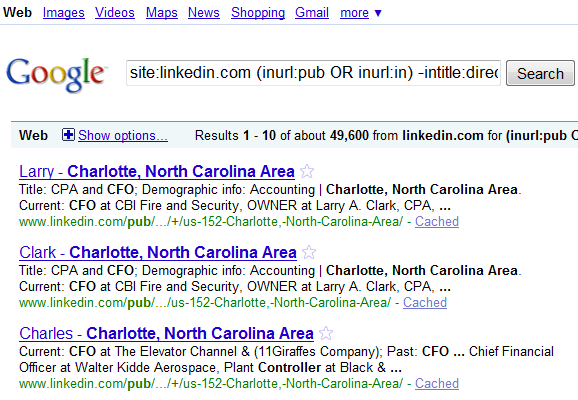
You’ll get results that look like this:
LinkedIn_XRay_Anomaly_1

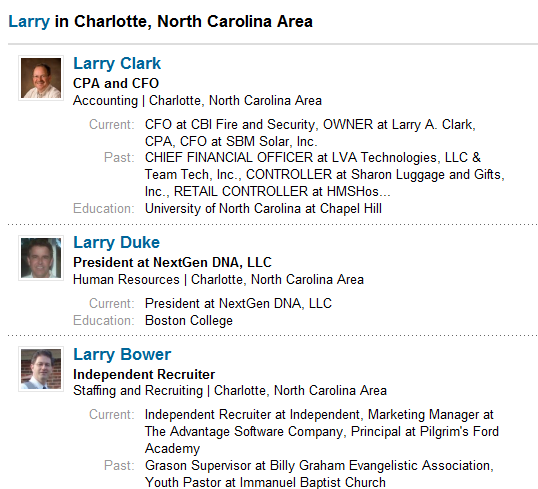
Notice how instead of returning results of individual LinkedIn profiles – for some reason, the results come back organized by first or last name. 

Clicking on the first result will take you to a page like this, where only the first result matches the X-Ray search parameters:
LinkedIn_XRay_Anolmaly_2

Hints in the URL

Notice the URL of each result:

LinkedIn_XRay_Anomaly_3

The URL is truncated – so we’re missing some info.

If you’re using Firefox, you can drag your cursor/pointer over the result title to view the entire URL (at the bottom of the browser). Simply clicking on an individual search result will also show you the entire URL:

LinkedIn_XRay_Anomaly_7

If you’re a search geek like me, you’re no doubt intrigued by the URL, and you’re trying to figure out exactly what LinkedIn is doing behind the scenes to take a “standard” X-Ray string and return results organized and grouped by first or last name.

I certainly didn’t search for “Larry.”

OR vs. AND

I’ve initially found that these new and different results seem to be more prevalent with X-Ray search strings using OR statements as opposed to simple AND-based queries.

For example, this 2 keyword X-Ray string brings back a mix of our more familiar individual profile results from LinkedIn as well as results grouped by first AND last name:
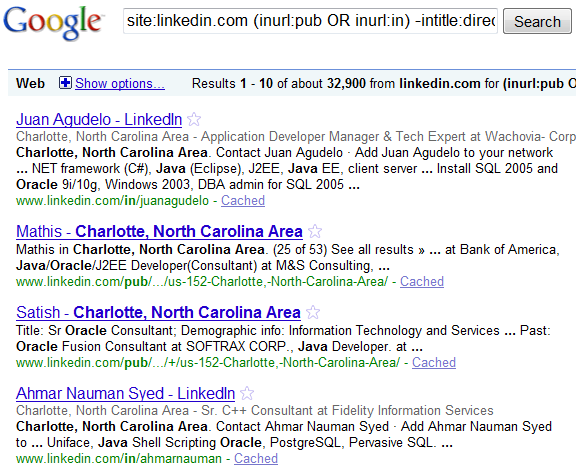
site:linkedin.com (inurl:pub OR inurl:in) -intitle:directory java oracle ”Charlotte, North Carolina Area”

LinkedIn_XRay_Anomaly_6

I haven’t yet figured out why an LinkedIn X-Ray searches with OR statements seem to have a much higher percentage of the new organized-by-first-or-last-name search results than X-Ray searches only using ANDs. 

Have any ideas?

Current Title Searches

For those who are curious – configuring X-Ray searches to try and target LinkedIn profiles with specific current titles (e.g., “current * controller”) are also similarly affected.

Actually, this kind of search seems to suffer more, because the result that actually matches the current title condition isn’t typically the first search result. In fact, in one of my tests, when clicking the first search result and searching through all of the results returned by first name  the only matching result on the first page was the 23rd!

site:linkedin.com (inurl:pub OR inurl:in) -intitle:directory “Charlotte, North Carolina Area” “current * controller”

The Fix

The good news, at least temporarily, is that we can easily get back to our more familiar X-Ray search results containing only individual LinkedIn profiles.

We can actually do this in at least a couple of different ways, but my preferred method works because all of the new and strange search results seem to have “dir” in the URL.

LinkedIn_XRay_Anomaly_5

That means all you have to do is add -inurl:dir to your X-Ray search strings.

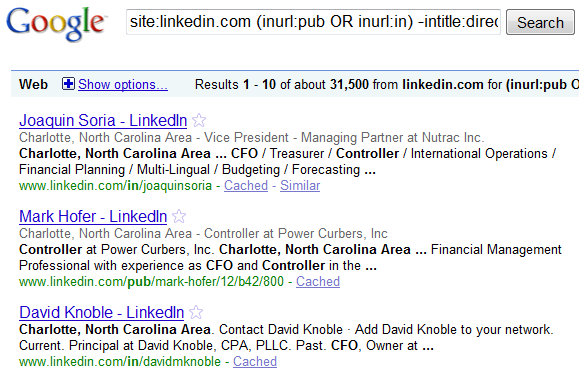
For example,  adding -inurl:dir to the X-Ray search I used at the beginning of this post:

site:linkedin.com (inurl:pub OR inurl:in) -intitle:directory -inurl:dir (controller OR CFO) “Charlotte, North Carolina Area”

Bye bye annoying non-individual, organized-by-last-name search results! 
LinkedIn_XRay_Anomaly_4

And if you run into a result or two that happen to be jobs, you can simply add -inurl:jobs to your string to make them vanish.

Is This The End?

For the time being, the -inurl:dir seems to get us back to our familiar individual LinkedIn profile search results, even for current title X-Ray searches.

However, many people (including me) have been wondering for years as to if, when, and how LinkedIn would make changes to the ability to effectively search for and find specific LinkedIn profiles using Internet search engines.

The folks at LinkedIn have always known that people can use Internet search engines to find LinkedIn profiles that are not in the searcher’s LinkedIn network. It’s a byproduct of publishing profiles to the web, which LinkedIn does by default unless the user changes their account settings.

Are we seeing the beginning of LinkedIn attempting to reign in X-Ray capability? I’m not so sure – I would think if they were going to make a such a move, it would be more effective.

Perhaps they are testing the waters to see how they can continue to publish profiles to the web yet affect X-Ray search results?

Keep a weather eye on the horizon.

Strictly for the Search Geeks

Do any of my fellow sourcing hackers have any ideas as to:

  1. What exactly is going on with the search results being returned and organized by first or last name?
  2. What determines whether a search result is organized by first as opposed to last name?
  3. Why do X-Ray searches with OR statements seem to have a higher percentage of the new search results than simple AND-style searches?
LinkedIn, x-ray search
  • Digg
  • Stumbleupon
  • Delicious
  • Reddit
  • Technorati

If you enjoyed this post, please consider to leave a comment or subscribe to the feed and get future articles delivered to your feed reader.

Comments

23 Responses to “LinkedIn X-Ray Search Results Change: Update Your Strings”
  • regina says:
    at

    I noticed this annoying new set up and tackled it by negating the dir just as you suggested. Linkedin is obviously up to something but what…..thanks to blackbelts such as yourself for keeping us on our toes….Keep up the good work

  • Tiffany says:
    at

    Thank you so much; I’ve been trying to figure this out off and on for the last week or so.

  • gary cozin says:
    at

    Interesting find & thanks for keeping an eye out for us! However, I find that it doesn’t happen with every x-ray search string I use – sometimes I get results w/o just first names the way we’re used to – not sure why it’s not consistent?

  • Boolean Black Belt says:
    at

    @ Regina – thanks! Great minds, you know….

    @ Tiffany – you’re very welcome!

    @Gary – it’s intermittent for me as well, but in my testing yesterday, the only strings that didn’t return at least some of the newer-style results organized by name were single keyword searches. Anything more specific and detailed than that evoked the odd results.

    @everyone else – I’m curious to see who can answer some of the questions I posed… :-)

  • Ollezazaz says:
    at

    I can’t answer any of the questions but I have some (conspiracy) theories.

    About #3: If the differences in results is really due to the use of OR, that means Google’s involved. Meaning that LI & Google may have cut a deal to alter the search results.

    Why? Read on.

    It could be that LI is going to monetize their search service by allowing recruiters more detailed search capabilities within their site. Notice I say “monetize” – you recruiters are going to have to pay-to-play for better access to the profile data. Your statement “LinkedIn attempting to reign in X-Ray capability” made me think about this.

    Adding ‘dir’ to the profile URLs could be a precursor to this.

    Be warned that if LI is really smart (hmmm) they can later, and very easily, replace ‘dir’ with a (semi)random string e.g. 1T4nz9wS, which would force the search results back to the funny ones you’ve been seeing — i.e. there would be no keyword available to filter out.

    Why do this?
    (1) LI wants to make money – who doesn’t!
    (2) They would still be providing general search capability to the casual searcher. 99.999% of the Web won’t be pissed off by the ‘dir’ listings.
    (3) They still provide general search capability to recruiters BUT if you want direct access to profiles, pay-to-play. Recruiters might be miffed but they won’t be pissed because you’ll still have access but you’ll have to work harder to get the info you want, the way you want it.

    And wouldn’t it be amusing – if this is all true – that LI’s enhanced search is powered by… Yes, you’ve guessed it.

  • Bob Williams says:
    at

    I think LinkedIn is playing games with the system to determine exactly how to make their preferred results show up first. I noticed several issues over the last week where despite anything I do I often get two LI job postings as my first two results.

    I used the -inurl:dir and then a -inurl:jobs and still got two job postings as results one and two. What this seems to indicate is that LinkedIn and google are trying to determine how to rank such search results.

    Other times I get what look like normal results but the link to the profile shows a “Profile doesn’t exist” page. An hour later the same search works fine…

    Being that the results are sporadic and have been changing in different ways, I think they are trying to figure out how to make their desired pages appear at the top of the search results page in google… at least we can hope that’s all they’re up to…

  • Ryan Leary says:
    at

    This is just bad. Forget the fact that we are recruiters and this will effect most of the industry.

    The bigger thing here is that should Google and LI be altering the search results together the bigger issue is now that Google is manipulating search and in essence saying that they own the world.

    It’s sort of the Free speech. Search is search and Google should really not be part of manipulating the data.

  • Ryan Leary says:
    at

    @BB – If I run simple searches I get the results returned just fine. Add a few details and it gets wacked. I’m still playing with it. I’ll post my results.

  • Boolean Black Belt says:
    at

    @Ollezazaz – you’re not the first person to suggest Google and LinkedIn are in cahoots, and it certainly makes sense that LI would try to explore new ways of ensuring monetization of their site/data/service. I appreciate your thoughtful response!

    @Bob – I wasn’t initially running into job results early last week, but now that you point it out – I am getting them as the first result for most of my searches. The combo of -inurl:dir -inurl:jobs seems to do the trick. For now. :-) I haven’t run into the “Profile doesn’t exist” issue, although I have had a few emails from readers complaining about it. If you run into it again, would you mind sending me the details so I can try to replicate and investigate?

    @Ryan – something *really* fishy is going on to be able to return results organized by name where only one of the results actually matches all of the search criteria. Still haven’t figured out how they (LinkedIn, Google, or LinkedIn + Google) are doing that. I, too, have found that single keyword queries don’t seem to elicit the odd new results, which adds to the mystery for me – because why would they only come back from multiple keyword and strings with ORs?

  • Ryan Leary says:
    at

    So I’ve had a bit of luck with the following string:

    site:linkedin.com “software engineer” (”distributed applications” OR multi-tier) “greater Philadelphia area” -inurl:jobs -inurl:dir

    http://bit.ly/9VVC5v

    If you swap out the OR statement and re-work it, it still works, however if I noticed that the titles of the results shown does not alwasy match the profile name once you click on the result. It’s always the same person, but the wording might be slightly different. I cannot remember this happening previously.

  • Ryan Leary says:
    at

    I also meant to mention that the order of results seems to come out normal with that string. Previously I was getting the same junk returned as you were with grouping of names etc.

  • gary cozin says:
    at

    I think the best fix for now is:

    site:linkedin.com keyword titles (inurl:pub | inurl:in) -intitle:directory -inurl:dir -inurl:jobs

    Until they change something again to skew the results!

  • Glennlist aka Michael Glenn says:
    at

    Here is my geeky response.

    Linkedin moved to Cloud server architecture in 2008. The Cloud caches the entire LinkedIn Network, but they were having some issues.

    Basically those long pauses you see on LI profile pages…they are trying to speed up those cached public profiles (when your logged in).

    As a result, you need to tweak your Google searches to get the results you want, however, it should be quicker to search profiles while ON Linkedin.

    My geeky guess.

  • passguide says:
    at

    ST0-10X 000-061

    So I’ve had a bit of luck with the following string:
    site:linkedin.com “software engineer” (”distributed applications” OR multi-tier) “greater Philadelphia area” -inurl:jobs -inurl:dir

  • Lori Freeman says:
    at

    I’m using this string today:

    site:linkedin.com (inurl:pub OR inurl:in) -intitle:directory (EAP | “employee assistance”) sales

    to find EAP salespeople. Any idea why all of my results are coming back in French (no matter where the candidate is located: chicago, st. louis, etc.)??

  • gary cozin says:
    at

    Lori -
    I had no problem when I just ran your search. Results were in English. Maybe by accident you xrayed the fr.linkedin.com (French linkedin site)? As Glen’s blog above illustrates, I suggest you add -inurl:dir to your string-

  • Bruce says:
    at

    I’m using this string today:

    site:linkedin.com (inurl:pub OR inurl:in) -intitle:directory (EAP | “employee assistance”) sales

    to find EAP salespeople. Any idea why all of my results are coming back in French (no matter where the candidate is located: chicago, st. louis, etc.)??

  • Lori Freeman says:
    at

    Thanks a ton Gary. I think I was wishing I was in France that day and my computer could just sense it….Hasn’t happened since.

  • Stewart says:
    at

    I have been using your search strings for sometime now and no problems, but most recently I have had google come back saying oops google cannot disply page results and the information google cannot send over the net. why? Also have had a few crashes during searches and string being inputted and have had to reboot pc and start again even then it comes up with a script box for security asking to input funny words to access google again.

    any views

  • Boolean Black Belt says:
    at

    @Stewart – did you get a chance to read my post on what to do when Google thinks you’re not human? Read the post and the comments as well which offer additional suggestions – it may offer you some relief from your search woes. Please let me know!

Leave Comment

Click here to cancel reply.


About Me

I have significant experience with and passion for leveraging technology and Lean principles to achieve high quality hires in a Just-In-Time manner. I'm a power user of Social Media, ATS and CRM applications, job board resume databases, the Internet, Boolean queries and semantic search for recruiting.

My LinkedIn profile Follow me on Twitter Find me on Facebook SlideShare presentations


Search

Archives

  • August 2010
  • July 2010
  • June 2010
  • May 2010
  • April 2010
  • March 2010
  • February 2010
  • January 2010
  • December 2009
  • November 2009
  • October 2009
  • September 2009
  • August 2009
  • July 2009
  • June 2009
  • May 2009
  • April 2009
  • March 2009
  • February 2009
  • January 2009
  • December 2008
  • November 2008
  • October 2008

Categories

  • Aggregators
  • Analytics
  • Applicant Tracking Systems (ATS)
  • Artificial Intelligence Matching
  • Best Practices
  • Boolean
  • Boolean 101
  • Boolean Logic
  • Boolean Search Tips and Tricks
  • Candidate Pipelining
  • Candidate Quality
  • Cold Calling
  • Conferences
  • Copyright Info
  • Diversity Sourcing
  • Events
  • Exalead
  • Extended Boolean
  • Facebook
  • Google
  • Hidden Talent Pools
  • How-To's
  • Human Capital Data
  • Industry Searching
  • Internet Sourcing
  • Jigsaw
  • Job Boards
  • Job Posting
  • Job Search
  • Lean/JIT Recruiting
  • LinkedIn
  • Mistakes
  • Monster
  • Monster vs. Google
  • Myths and Misconceptions
  • NEAR Operator
  • Passive Candidates
  • Passive Sourcing and Recruiting
  • Proximity Searching
  • Recruiting Technology
  • Relationship Building
  • Resume Aggregators
  • Resume Sourcing
  • Resume Sourcing vs. Cold Calling
  • Resume Writing
  • Search Process
  • Semantic Search
  • Social Media
  • Social Networking
  • Social Recruiting
  • SourceCon
  • Sourcing and Recruiting
  • Sourcing Automation
  • Sourcing in Europe
  • Sourcing Mistakes
  • Spoke
  • Talent Intelligence
  • Talent Mining
  • Talent Warehouse
  • Thank you!
  • Traffic Data
  • Training Sourcers and Recruiters
  • Twitter
  • Uncategorized
  • x-ray search
  • Yahoo
  • ZoomInfo


  • Recent Posts

    • Boolean Black Belt Website Visitor Analytics
    • Private and Out of Network Search Results on LinkedIn
    • Anti-Social Recruiting
    • Denver Colorado Recruiting Conference August 25th
    • Recruiting is a Matter of Perspective
  • Twitter

    • I'm at Grand Hampton Clubhouse. http://4sq.com/c6C5Cn 6 days ago
    • Wish people showed more respect for truckers on the road - they quite literally are the cornerstone of our economy! 1 week ago
    • I'm at Kforce, Inc. (1001 East Palm AVE, Tampa). http://4sq.com/bqKYmW 1 week ago
    • More updates...

    Posting tweet...

    Powered by Twitter Tools

  • Recent Comments

    • Teresa Wedgworth: Hallo, danke für die Info, hat mir sehr weitergeholfen, f...
    • Natalia: I like the distinction made between social media marketing v...
    • Matt Kerr: I like using the Concatenate function on excel to combine th...
    • fraggy: got it john - i did =H$2&B2&H$2 in column d and =D...
    • John: replace the "" (the double ") with H2&" H2 is the cel...


  • Links

    • Boolean Strings (LinkedIn) - Group for Sourcers, Recruiters, Sales and other professionals who are interested in Searching the web to gather information for business.
    • Boolean Strings Network - A web sourcing community sharing best practices for leveraging Boolean search strings
    • Cloud Recruiting - Expose yourself to the cutting edge of mobile recruiting
    • Magic Method - A place to learn about telephone names sourcing.
    • Recruiting Pulse - Your single source for all things recruiting – aggregator of over 40 sourcing, recruiting and HR blogs
    • Sourcing Talent - Insightful Secrets, Tips, and Tricks to finding Talent on the web
    • The Recruiters Lounge - Written by Jim Stroud (and friends) and explores the wacky world of employment with articles, podcasts, videos, comics and more.
    • TheSourceress - Grandmaster Sourcer Katharine Robinson’s blog

Powered by Wordpress | WP Premium theme by PSD to XHTML
Copyright 2010 Boolean Black Belt. All rights reserved

  • FREE Sourcing + Recruiting Resources
  • Who is the Boolean Black Belt?
  • Contact Me
  • Copyright, Disclaimer, Photos