
Boolean Black Belt

Leveraging social networks, resume databases, and the Internet for sourcing and recruiting

  • FREE Sourcing + Recruiting Resources
  • Who is the Boolean Black Belt?
  • Contact Me
  • Copyright, Disclaimer, Photos

Subscribe via Email

adobe illustrator cs serials Buy Adobe Illustrator CS5 for Mac OEM - Online Software Downloads Center illustrator brushes adobe photoshop adobe Buy Adobe Illustrator CS5 OEM - Online Software Downloads Center free tutorial aging picture adobe photoshop adobe cs2 free illustrator trial Buy Adobe Creative Suite 5 Master Collection OEM - Online Software Downloads Center adobe illustrator cs 11 serial free adobe illustrator cs key Buy Adobe Flash Professional CS5 for Mac OEM - Online Software Downloads Center adobe cs2 indesign personal seminar started adobe illustrator 10 mac Buy Adobe Flash Professional CS5 OEM - Online Software Downloads Center adobe indesign free download adobe illustrator envelope no 10 Buy Adobe Photoshop CS5 Extended for Mac OEM - Online Software Downloads Center fonts adobe indesign adobe photoshop cs2 prefence settings Buy Adobe Dreamweaver CS5 for Mac OEM - Online Software Downloads Center adobe photoshop animals free 2007 adobe photoshop program Buy Adobe InDesign CS5 for Mac OEM - Online Software Downloads Center adobe photoshop keys import corel draw into adobe illustrator Buy Adobe InDesign CS5 OEM - Online Software Downloads Center adobe books illustrator academic version of dreamweaver adobe Buy Adobe Creative Suite 5 Master Collection for Mac OEM - Online Software Downloads Center adobe photoshop freezes adobe photoshop element 5 0 Buy Adobe Dreamweaver CS5 OEM - Online Software Downloads Center adobe photoshop save photo without background loading font in adobe photoshop Buy Adobe Photoshop CS5 Extended OEM - Online Software Downloads Center adobe photoshop cs3 torrent torrentspy

How to Search Twitter for Sourcing and Recruiting

Posted at April 6, 2009

It appears that many people in the sourcing, recruiting, and staffing industry are all a-twitter about Twitter these days. My professional opinion is that Twitter is best utilized for personal and corporate branding, as well as socializing job opportunities – in other words, PASSIVE sourcing and recruiting techniques.

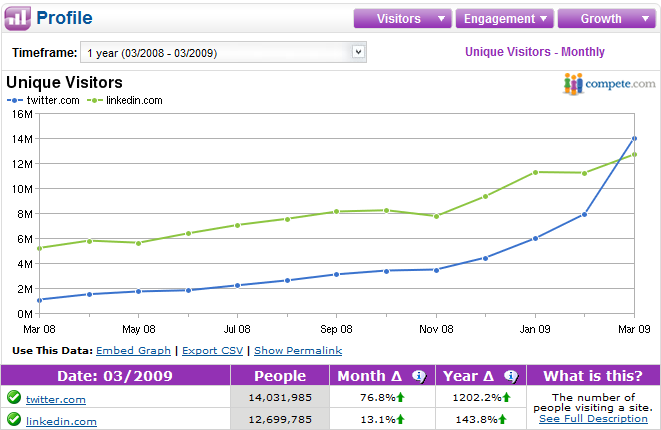
However, even if you’re a Twitter-hater, you cannot deny the buzz and the traffic that Twitter has been generating (1200% YOY growth). Also – did you know that Twitter just surpassed LinkedIn in terms of unique U.S. visitors in March? As such, it would be foolish for sourcers and recruiters to avoid trying to figure out how to best leverage the 14 million+ Twitter users to identify potential candidates.
Using Twitter for Active Candidate Identification

If you’ve ever found yourself wondering if you should and how you can leverage Twitter in your ACTIVE talent identification efforts, you’ve come to the right place.

While Twitter is an intrinsically shallow source of human capital data (140 character Tweets and 160 character bios), unlike Facebook – it is quite searchable. In this post I am going to review and compare 6 effective methods of searching Twitter for ACTIVE candidate identification: Twitter’s Advanced Search, Power Twitter, TweetDeck, Twellow, TweetGrid, and X-Ray searching Twitter – including 5 video walk-throughs of how to maximize your searching efforts with each application.

Searching Twitter with…Twitter

Twitter’s advanced search interface and functionality is quite robust, supporting standard Boolean search with AND (any space is an “implied AND”), OR, NOT (via the – sign), and phrase searching, as well as special search operators such as the hashtag (#).

Three of the most useful search features of Twitter are hashtags, geocoding, and RSS feeds.  When it comes to trying to find people with specific skills who live in specific places, being able to track groups/conversations via hashtags and to search by location is HUGE. Also, it’s highly convenient to essentially convert a search into an RSS feed that you can keep tabs on.

Rather than write about how to leverage Twitter’s hashtags, geocoding, and RSS feeds – I’ll go a step further and show you how they work in this short video. I can almost guarantee you that you’ll learning something new by watching this (please be patient – it might take a few moments to load):

The downside to searching Twitter with Twitter’s search interface is that it only appears to search Tweets – not the text contained in the bio section of the Twitter profile. This is unfortunate because some very good data can be found in the bio section, including professional/employment data including skills, technologies, and titles that can help you identify potential candidates.

Searching Twitter with the Power Twitter Extension for Firefox

If you use Mozilla’s Firefox Internet browser, you can harness the power of Twitter’s search functionality right from your browser with the Power Twitter add-on.

Once you download and add Power Twitter to Firefox, you can conveniently type your searches into the Power Twitter search bar located at the top of your browser window:

And hit “Enter” to be taken to your results:
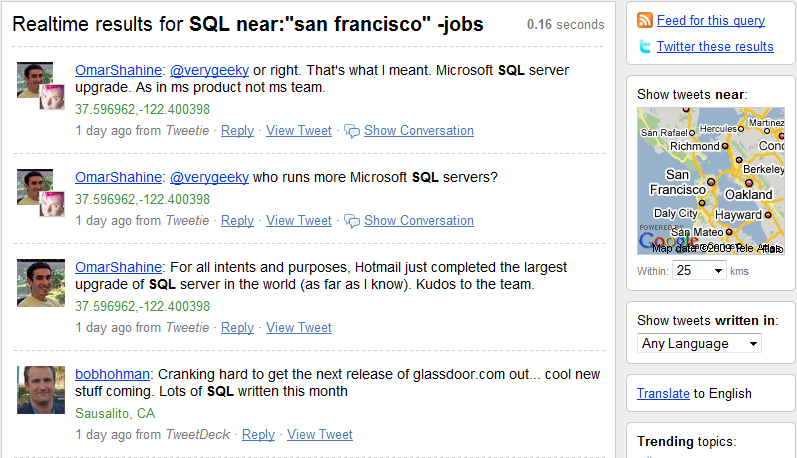
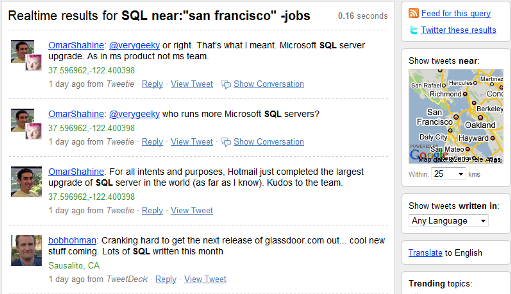
Using the Power Twitter add-on essentially affords you all of Twitter’s search power and functionality, all from the convenience of your Firefox browser.

Searching Twitter with TweetDeck

TweetDeck is a fantastic application I use to manage Twitter – I highly recommend it. Not only does it allow you to easily track Tweets, replies, and direct messages – you can also use it to run searches and keep tabs on the results in real-time.

TweetDeck supports AND, OR, NOT (- sign), phrase, (quotation marks) and hashtag (#) searching. Click on the image below to view a short video of how to execute searches for candidates using TweetDeck (please be patient – it might take a few moments to load):

The one major limitation of using TweetDeck for searching for candidates is that it unfortunately does not support the ability to search by location. You cannot use Twitter’s near/within operator combo to target local results, and TweetDeck does not search the bio or location fields of Twitter profiles where location data can also be found. You can of course try and search for mentions of cities and locations in actual Tweets – but this is an unreliable and ineffective way of yielding relevant and local results.

Searching Twitter with TweetGrid

TweetGrid is an interesting application that allows you to create a Twitter search dashboard that updates in real time. TweetGrid supports AND, OR, NOT (- sign), and phrase searching (quotation marks). It also allows for reliable location searching via geocoding and the near/within operator combo. Here is the full list of TweetGrid search operators/functions.

With TweetGrid you can configure and create a search dashboard to track and display the results of multiple searches – you can choose how many searches you’d like to track.

View this video clip for a quick walk-through of the search functions and features of TweetGrid (please be patient – it might take a few moments to load):

 

Searching Twitter with Twellow

Twellow is a solid Twitter application that affords users a number of benefits. Searching Twellow to identify potential candidates can be accomplished using Twellow’s own take on the standard Boolean search operators: AND (&), OR (|), NOT (-sign) and phrase searching (quotation marks).

What’s great about Twellow is that unlike Twitter’s Advanced Search, Twellow searches text in Tweets AND in the bio and location fields.  Additionally, Twellow also supports field-specific searching with the @ operator – allowing you to target words and phrases in the name, screen_name, location, bio, and extended_bio fields. Click here to see a complete list of Twellow’s search operators.

What Twellow doesn’t have is location search powered by geocoding. Location searching is accomplished by searching for mentions of your target locations in Tweets and the location field.

Click here for a short demonstration video of how to search Twellow for candidates (please be patient – it might take a few moments to load):

TwellowHood

Before moving on, I wanted to show you an interesting feature of Twellow that involves an interactive map that you can click on to zoom-in to explore locations in the U.S. and Canada to find lists of people on Twitter by city. 

Here’s a quick video demonstrating TwellowHood’s functionality – click on the image (please be patient – it might take a few moments to load):
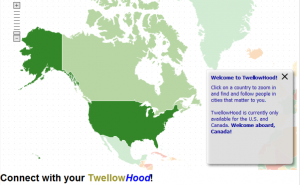
The downside to TwellowHood is that you cannot sort the results nor can you search them.  They appear to be sorted high to low by # of followers by default. Also – although the TwellowHood map is currently only for the United States and Canada, they are working to add other countries in the near future.

X-Ray Searching Twitter

If you don’t want to use someone else’s Twitter application to search for people on Twitter, you can always try and use an Internet search engine to X-Ray Twitter for the information you need. Thankfully, Twitter is very “X-Rayable.”

For example, let’s say you’re targeting people who mention PHP and who live in the Atlanta area.  You could go to Google and enter this:

site:twitter.com atlanta php ~develop -jobs

Here’s a snippet of the page 1 results (over 400 total results):

You can see results for an Atlanta PHP group, a job posting for a developer, and PHP developer – all in Atlanta.

Using the Exalead search engine, we can tap into the power of proximity searching and look for people on Twitter who mention PHP within 5 words of some mention of coding or the word developer:

site:twitter.com AND PHP AND (code OR coding OR coder OR developer) NEAR/5 PHP AND atlanta

Here’s a screenshot of some page 1 results:

Clicking on @cspruck to sample the quality of the results:

A PHP developer in a suburb of Atlanta – success!

Conclusion

With the many existing Twitter applications available today and the new Twitter apps that seem to pop up almost weekly, it’s easy to get overwhelmed and not know where to begin.

From what I have been able to get my hands on, I think that Twitter’s Advanced Search, Power Twitter, TweetDeck, Twellow, TweetGrid, and X-Ray searching Twitter are the most effective means by which to actively search for and identify potential candidates.

Here’s a quick review of the pros/cons of each:

Twitter Search

  • AND/OR/NOT + phrase search
  • Precise location search via geocoding
  • Hashtag (#) searching to track relevant topics/conversations/threads
  • Ability to configure RSS feeds for search results
  • No ability to search bio field, where valuable and relevant information can be found

Power Twitter

  • Convenience of all above Twitter search functionality straight from Firefox browser

TweetDeck

  • AND/OR/NOT + phrase search
  • Hashtag (#) searching to track relevant topics/conversations/threads
  • No ability to search by location – neither geocoding nor location field searching supported
  • Searches only Tweets – no bio info/data

TweetGrid

  • AND/OR/NOT + phrase search
  • Precise location search via geocoding
  • Hashtag (#) searching
  • Ability to create a Twitter search dashboard to get real-time results for up to 6 searches
  • Does not appear to search information contained in the bio field
Twellow
  • AND/OR/NOT + phrase search
  • Searches Tweets, location, and bio fields by default
  • Ability to specifically target and search fields: bio, location, etc.
  • Location search via geocoding not supported
  • TwellowHood a nice location search feature, but not searchable or sortable
X-Ray Search
  • Ability to leverage search engine specific operators/functionality (Google’s synonym search, Exalead’s proximity search, etc.)
  • Can search information in Tweets, bio, and location fields
  • No ability to perform geocoding location search

Instead of being limited to potentially sinking significant amounts of time into Twitter with PASSIVE sourcing and recruiting techniques that have a low ROI, you’re now armed with several methods of taking an ACTIVE role in leveraging Twitter to search for, find and acquire candidates!

How-To's, Twitter
  • Digg
  • Stumbleupon
  • Delicious
  • Reddit
  • Technorati

If you enjoyed this post, please consider to leave a comment or subscribe to the feed and get future articles delivered to your feed reader.

Comments

18 Responses to “How to Search Twitter for Sourcing and Recruiting”
  • Regina says:
    at

    As always a great article…Keep up the good work

  • Tina says:
    at

    Hi,
    It was a very informative and interesting read and watch. Thank you for sharing your knowledge with everyone.
    I am not an avid user of Twitter, although registered there and can see the potential it has. I was wondering whether you have researched sourcing people residing outside US, as the Middle East for example, and in particular UAE? I am primarily using http://www.linkedin.com for name gathering and would appreciate to get your or anyone’s feedback on sourcing candidates in the UAE. Thanks!

  • Jenny DeVaughn says:
    at

    Http://www.nambu.com is amazing upgrade from TweetDeck for Mac users. Too bad I’m a PC.

  • howard bin says:
    at

    I think that TweetGrid is using the search API that Twitter provides for anyone for free, and they should mention that or put a small “Powered by twitter” in the website but unfortunately they did not. Using twitter API, TweetGrid has the same search capability as Twitter search, and also has the same downside which is
    “No ability to search bio field, where valuable and relevant information can be found”. The only new thing in TweetGrid is that you can have multiple searches (Up to 9 searches) in one page.

  • Art Vandalay says:
    at

    While the article is well done, and it shows a few good ways to search Twitter- I think Twitter could be a terrible waste of time when searching for candidates. Just looking at the results you get- there is hardly any valuable information available, which means after you find a tweet that looks like it’s from a business person, rather than a bored blogger- you have to do more research to figure out exactly what the heck it is they do for a living (besides tweet)
    LinkedIn is a much better source for finding candidates. You get their title and company at the least- and a lot of times prior work experience, education, and a brief profile.

  • Aylin says:
    at

    Hi there,

    Thanks for sharing your knowledge and thoughts, I think you’ve sumed up twitter as a potential recruitment/sourcing tool very well.
    I love Twitter as it creates a opportunity to network with people globally with similar interests as you. I’ve been noticing more and more recruiters spamming job ads and i think to myself, whether that actually works for them?
    Twitter is a great tool for creating connections but as a direct recruitment tool, i agree with you and think that it won’t pick up in Aus like it did in the US.

  • Priti says:
    at

    Hi Glen,

    I am very glad to have bumped in to this amazing website which is truly informative and encouraging for people like me who are constantly looking to leverage their skills.
    It takes a lot of effort and heart to share one’s wisdom with others and that too for FREE !! So…My heartfelt thanks for sharing your articles…
    I am and was not crazy about using Twitter, but now I am motivated to master this technique too other than depending on Google and LinkedIn

    Thanks Again for everything

    Many Regards
    Priti Goel

  • Jamie says:
    at

    tweepsearch.com may be useful as well. It searches twitter profile and bio information.

  • Sarang Brahme says:
    at

    Hi Glen,

    Recently I started exploring twitter as a sourcing tool and this article has given me a great head-start to my journey. I really thank you for this information which is a text-book for me….

    Sarang

  • Boolean Black Belt says:
    at

    Thank you to everyone who has commented – I sincerely appreciate your feedback and thoughts!

    Jamie – thanks for the heads-up on TweepSearch – I’ll definitely check it out.

  • Patrick Byrd says:
    at

    Glen,

    Don’t forget http://www.wink.com has search fields for name, location, and other information (essentially a bio search), that goes out and gathers up results across several social networks (facebook, twitter, myspace, even flickr).

    -Patrick
    @pbeximer

  • Ali says:
    at

    Glen,
    Many thanks! Thanks also to your bloggers who offered some great resources and/or tips.

    Ali

  • Brooke says:
    at

    Thanks so much for the info!! You are awesome!!

  • tweecal says:
    at

    I have built a search engine to collect jobs from twitter, also a web Cv where users can post their profiles to be searched by recruiters. So you may want to check it out

Leave Comment

Click here to cancel reply.


About Me

I have significant experience with and passion for leveraging technology and Lean principles to achieve high quality hires in a Just-In-Time manner. I'm a power user of Social Media, ATS and CRM applications, job board resume databases, the Internet, Boolean queries and semantic search for recruiting.

My LinkedIn profile Follow me on Twitter Find me on Facebook SlideShare presentations


Search

Archives

  • August 2010
  • July 2010
  • June 2010
  • May 2010
  • April 2010
  • March 2010
  • February 2010
  • January 2010
  • December 2009
  • November 2009
  • October 2009
  • September 2009
  • August 2009
  • July 2009
  • June 2009
  • May 2009
  • April 2009
  • March 2009
  • February 2009
  • January 2009
  • December 2008
  • November 2008
  • October 2008

Categories

  • Aggregators
  • Analytics
  • Applicant Tracking Systems (ATS)
  • Artificial Intelligence Matching
  • Best Practices
  • Boolean
  • Boolean 101
  • Boolean Logic
  • Boolean Search Tips and Tricks
  • Candidate Pipelining
  • Candidate Quality
  • Cold Calling
  • Conferences
  • Copyright Info
  • Diversity Sourcing
  • Events
  • Exalead
  • Extended Boolean
  • Facebook
  • Google
  • Hidden Talent Pools
  • How-To's
  • Human Capital Data
  • Industry Searching
  • Internet Sourcing
  • Jigsaw
  • Job Boards
  • Job Posting
  • Job Search
  • Lean/JIT Recruiting
  • LinkedIn
  • Mistakes
  • Monster
  • Monster vs. Google
  • Myths and Misconceptions
  • NEAR Operator
  • Passive Candidates
  • Passive Sourcing and Recruiting
  • Proximity Searching
  • Recruiting Technology
  • Relationship Building
  • Resume Aggregators
  • Resume Sourcing
  • Resume Sourcing vs. Cold Calling
  • Resume Writing
  • Search Process
  • Semantic Search
  • Social Media
  • Social Networking
  • Social Recruiting
  • SourceCon
  • Sourcing and Recruiting
  • Sourcing Automation
  • Sourcing in Europe
  • Sourcing Mistakes
  • Spoke
  • Talent Intelligence
  • Talent Mining
  • Talent Warehouse
  • Thank you!
  • Traffic Data
  • Training Sourcers and Recruiters
  • Twitter
  • Uncategorized
  • x-ray search
  • Yahoo
  • ZoomInfo


  • Recent Posts

    • Boolean Black Belt Website Visitor Analytics
    • Private and Out of Network Search Results on LinkedIn
    • Anti-Social Recruiting
    • Denver Colorado Recruiting Conference August 25th
    • Recruiting is a Matter of Perspective
  • Twitter

    • I'm at Grand Hampton Clubhouse. http://4sq.com/c6C5Cn 2 days ago
    • Wish people showed more respect for truckers on the road - they quite literally are the cornerstone of our economy! 3 days ago
    • I'm at Kforce, Inc. (1001 East Palm AVE, Tampa). http://4sq.com/bqKYmW 3 days ago
    • More updates...

    Posting tweet...

    Powered by Twitter Tools

  • Recent Comments

    • Matt Kerr: I like using the Concatenate function on excel to combine th...
    • fraggy: got it john - i did =H$2&B2&H$2 in column d and =D...
    • John: replace the "" (the double ") with H2&" H2 is the cel...
    • Steve Cherry: Spot on - Latin may be the mother tongue of modern language,...
    • fraggy: John, I tried your formula and am getting an error - spec...


  • Links

    • Boolean Strings (LinkedIn) - Group for Sourcers, Recruiters, Sales and other professionals who are interested in Searching the web to gather information for business.
    • Boolean Strings Network - A web sourcing community sharing best practices for leveraging Boolean search strings
    • Cloud Recruiting - Expose yourself to the cutting edge of mobile recruiting
    • Magic Method - A place to learn about telephone names sourcing.
    • Recruiting Pulse - Your single source for all things recruiting – aggregator of over 40 sourcing, recruiting and HR blogs
    • Sourcing Talent - Insightful Secrets, Tips, and Tricks to finding Talent on the web
    • The Recruiters Lounge - Written by Jim Stroud (and friends) and explores the wacky world of employment with articles, podcasts, videos, comics and more.
    • TheSourceress - Grandmaster Sourcer Katharine Robinson’s blog

Powered by Wordpress | WP Premium theme by PSD to XHTML
Copyright 2010 Boolean Black Belt. All rights reserved

  • FREE Sourcing + Recruiting Resources
  • Who is the Boolean Black Belt?
  • Contact Me
  • Copyright, Disclaimer, Photos