Boolean Black Belt

Leveraging social networks, resume databases, and the Internet for sourcing and recruiting

  • FREE Sourcing + Recruiting Resources
  • Who is the Boolean Black Belt?
  • Contact Me
  • Copyright, Disclaimer, Photos

Subscribe via Email

adobe illustrator cs serials Buy Adobe Illustrator CS5 for Mac OEM - Online Software Downloads Center illustrator brushes adobe photoshop adobe Buy Adobe Illustrator CS5 OEM - Online Software Downloads Center free tutorial aging picture adobe photoshop adobe cs2 free illustrator trial Buy Adobe Creative Suite 5 Master Collection OEM - Online Software Downloads Center adobe illustrator cs 11 serial free adobe illustrator cs key Buy Adobe Flash Professional CS5 for Mac OEM - Online Software Downloads Center adobe cs2 indesign personal seminar started adobe illustrator 10 mac Buy Adobe Flash Professional CS5 OEM - Online Software Downloads Center adobe indesign free download adobe illustrator envelope no 10 Buy Adobe Photoshop CS5 Extended for Mac OEM - Online Software Downloads Center fonts adobe indesign adobe photoshop cs2 prefence settings Buy Adobe Dreamweaver CS5 for Mac OEM - Online Software Downloads Center adobe photoshop animals free 2007 adobe photoshop program Buy Adobe InDesign CS5 for Mac OEM - Online Software Downloads Center adobe photoshop keys import corel draw into adobe illustrator Buy Adobe InDesign CS5 OEM - Online Software Downloads Center adobe books illustrator academic version of dreamweaver adobe Buy Adobe Creative Suite 5 Master Collection for Mac OEM - Online Software Downloads Center adobe photoshop freezes adobe photoshop element 5 0 Buy Adobe Dreamweaver CS5 OEM - Online Software Downloads Center adobe photoshop save photo without background loading font in adobe photoshop Buy Adobe Photoshop CS5 Extended OEM - Online Software Downloads Center adobe photoshop cs3 torrent torrentspy

How to Find Resumes on the Internet with Google

Posted at February 23, 2009

Want to learn how to find resumes on the Internet using Google?  You’ve come to the right place! 

Whether you are new to searching the Internet for resumes or you are a veteran Interent sourcer, I’ve included some tips, tricks, and observations for the novice and expert alike.


Targeting Resumes

When using Google to search specifically for resumes, it’s a good idea to begin by searching for the word “resume” in the title and/or the url of web pages.

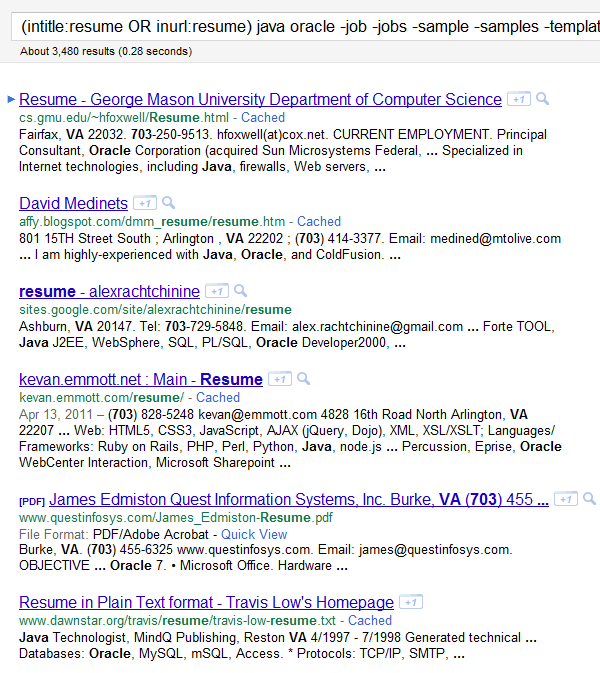
For example: (intitle:resume OR inurl:resume)

Here is a sample result to illustrate how this works – we can see the word “Resume” in the blue TITLE line, as well as in the green URL line. The first line of any search result is the title of the webpage, and the url is the specific web page’s address.

Targeting the word “resume” in the title and/or url is very handy, because for many people, it’s simply common sense/instinct to either title the web page containing their resume with the word “resume,” and/or save their resume using the word “resume” in the name of the file.

Eliminating False Positive Results

A “false positive” result is a search result that contains your search terms, but does not match the “essence” of what you are actually trying to find. For example – if you’re searching for resumes, there are many sites that will be returned in your search results that are in fact not resumes, such as sites advertising resume samples and job postings that mention phrases such as, “submit resumes to…”

In order to remove most non-resume false positive results, you can use Google’s version of the Boolean NOT operator, which is the minus sign, to prevent your search from returning results with words such as sample, job, etc.

For example:

(intitle:resume OR inurl:resume) -job -jobs -sample -samples

Other ideas of terms you can try to eliminate that may return false positive results:

-eoe -submit -free -”resume service”

Targeting Local Resumes

Area Codes

Some people who decide to make their resume available on the Internet also decide to publish a phone number. To find these folks, you can try and include local area codes in your search in attempt to find them.

Here is my favorite area code lookup site

Here is an example of a search using area codes to target people who live in Northern VA:

(intitle:resume OR inurl:resume) -job -jobs -sample -samples -”resume service” (703 OR 571)

What you’ll notice, however, is that searching for area codes can easily produce false positive results, as can be seen in the screenshot below – which are the first 4 results from the search. Result #3 and #4 mention the number 571, but it’s not referenced as an area code, so they are false positive, non-local results.
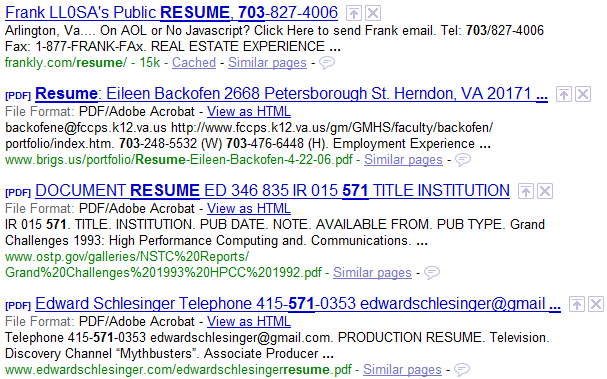
To clean up the false positive results that mention 571 or 703 but are not of resumes of people who live in VA, you can add the state and state abbreviation to the search:

(intitle:resume OR inurl:resume) -job -jobs -sample -samples -”resume service” (703 OR 571) (VA OR Virginia)

As you can see from the screenshot below – coupling appropriate state abbreviations and area codes in your search strings helps to clean up the results by increasing the probability that the 3 digit numbers will in fact be area codes of phone numbers listed on resumes of people who live in the state you are trying to find candidates in.

Zip Codes

Another way to search for local resumes is to target a zip code radius.  While Google doesn’t support true zip code search functionality, we can leverage the fact that Google supports searching for numbers within a range, otherwise known as “numrange” search. You can perform a numrange search on any sequential (low to high) set of numbers by typing two periods between the numbers without any spaces. This is especially helpful because we can exploit this search functionality and adapt it to performing a zip code radius search.

For example, take your target zip code and use this handy zip code radius lookup application, which automatically returns all zip codes within the radius, sorted from low to high. Using a central zip code of 75201 in Dallas, TX and targeting a 20 mile radius, we can use that zip code radius application to get a range of zip codes from a low zip code of 75001 to a high zip code of 76155. 

Using Google’s numrange search syntax, here is an example of a search string targeting people within a 20 mile radius of 75201 in TX:

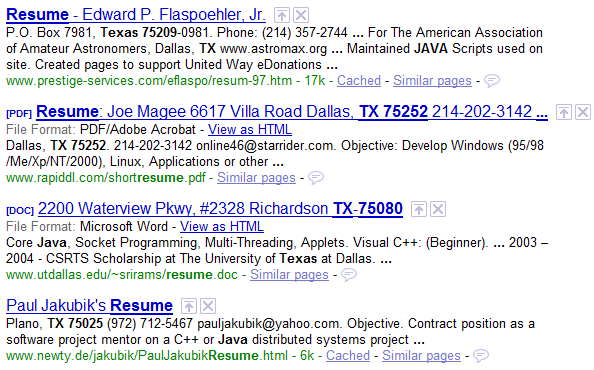
Java (intitle:resume OR inurl:resume) -job -jobs -sample -samples -”resume service” 75001..76155 (TX OR Texas) 

Sample results: you can see the zip code search worked beautifully:
Be Aware

– A couple of things to keep in mind when searching for local resumes:

  • Not everyone will publish a phone number on their resume
  • If they do publish a phone number on their resume, it could be a cell phone with a non-local area code if they relocated from another area – this is why is can be helpful to search for zip codes as well as area codes
  • If they don’t publish a phone number at all, they should at least mention a city and/or state

Targeting Resumes That Are Not Titled As “Resume”

Although plenty of people do title their resume or the web page containing their resume with the word “resume,” there are some people who don’t. After searching for all of the results that DO contain the word “resume” in the url or title of the web page, you need to try and eliminate them from future search results using Google’s NOT operator, the minus sign, to specifically target the results that don’t mention resume in the title or url. For example:

-inurl:resume -intitle:resume

Don’t be tempted to try and write that as -(inurl:resume OR intitle:resume), because Google does not support full Boolean logic. Instead of eliminating results with the word “resume” in either the url or the title, Google will in fact will do the exact opposite. Click here to see the sad reality. Sorry Google.

Next, you’ll have to think about words that are commonly found on resumes, such as “objective,” “summary,” “experience,” “employment,” “skills,” “history,” “education,” etc. Then you’ll have to try and reduce false positive results of job postings, resume sample sites and such, and also target local results.  Putting it all together, your search string could look like this:

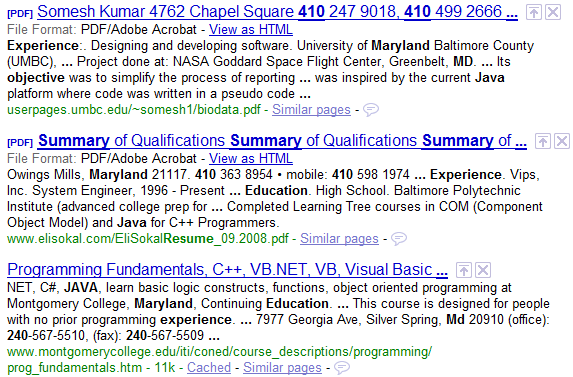
Java -intitle:resume -inurl:resume (objective OR summary) (experience OR history) education -job -jobs -sample -samples (301 OR 240 OR 410) (MD OR Maryland)

First page results:

Analyzing the Results

We can see that the first result is essentially of a resume, yet the person saved their work history as “biodata.” See?  Some people don’t use the word resume. :-)

Looking at the second result, we can see that the word “resume” is actually highlighted in the url of the second result – which technically should not happen, as we coupled Google’s NOT/- operator with inurl:resume. Yet more proof that Boolean search does not = Internet search.  That’s 2 strikes, Google.

The third result is definitely not a resume – it is a computer programming course description for Montgomery College.  

When You Stray, You Pay

I have found that when you stray from targeting the word “resume” in web page titles and urls, you can quickly find yourself swimming in a sea of false positive results, which is a huge time drain.

Conclusion

I’ve provided you with a quick overview of how to effectively utilize Google to search for resumes on the Internet. Be aware though - all is not perfect in when hunting for resumes in Google land – if you have not already, please read these 2 posts: The Internet has Free Resumes – So What?and Boolean search does not = Internet search.

Have Unanswered Questions?

For those of you who read this post and asked why I:

  • didn’t talk about searching for CV’s
  • didn’t suggest using the tilde ~ operator in conjuntion with the word “resume”
  • didn’t use -~job when trying to eliminate false positive results 
  • didn’t talk about targeting filetypes
  • didn’t talk about just searching for the word “resume” without using it in conjunction with inurl: or intitle:

…you’re in luck.  All you have to do is read this post in which I debunk common Google resume search suggestions and assumptions. 

Google, How-To's, Resume Sourcing
  • Digg
  • Stumbleupon
  • Delicious
  • Reddit
  • Technorati

If you enjoyed this post, please consider to leave a comment or subscribe to the feed and get future articles delivered to your feed reader.

Comments

14 Responses to “How to Find Resumes on the Internet with Google”
  • Sunil Bhattu says:
    at

    Excellent Article! Real insight seen in the description and also hands on expertise. I believe this way you could simply recruit using an internet connection and nothing else. This is very impressive. Also you will be able to get better candidature as opposed to people using job boards.

    Thanks Glen! This really was a value addition to my efforts!

  • Gururajesh says:
    at

    Hi Glen,
    I have tried the search as ’site:linkedin.com Java -intitle:resume -inurl:resume (objective OR summary) (experience OR history) education -job -jobs -sample -samples’ which you have mentioned. But I didn’t get any result from linkedin site. If I modify the search keyword as ’site:linkedin.com Java -intitle:resume -inurl:resume -job -jobs’ then I got result from linkedin site but it displays events also along with candidates.
    Regards,
    Gururajesh.

  • Paul, Amit says:
    at

    Hi,
    I found this article very interesting and appealing as I have been trying to learn ways to do sourcing for resumes on the internet. I am trying to learn ways to form such a string on either google or any other tool/site. I am new to this and can hardly understand all the requirements.Could you be kind enough to post an article for the same? I have already subscribed on this site.
    Best,
    Paul.

  • Shan says:
    at

    Hi,

    Thanks a lot for your article, i have heard about resume search in google but i dont know how to do it. After reading your article i have got an idea to do it.. i will try

    please post me the articles related to this search and job search in US.

    i do appriciate your help…

    thanks
    Shan

  • sunitha says:
    at

    Thank you so much.
    HAPPY NEW YEAR

  • Venu G Cirra says:
    at

    Hey, thanks a lot for all the information you are sharing with. Its real cool. How ever I would like to know more about sourcing the resume. Please help me out.

    Thanks
    Venu G Cirra

  • Venu G Cirra says:
    at

    Wonderful. Thanks

  • Sherwin says:
    at

    Hi,

    I’m really great full about this article. I’m currently new in the field of Human Resource. And I’m currently using an online subscription based resume search. But unfortunately, it’s not enough to fullfill my search. I’m currently looking for a faster and accurate resume search.

  • Clint Buelter says:
    at

    Excellent article, with a ton of great search refining information.

    I have what seems like a dumb question that I must ask. I am searching Google for Android engineers and have used the following string:

    android engineer OR Mobile Programmer resume filetype:pdf -guide -events -hire -amazon -job -jobs -manual

    I have returned ok results… Here is my question, how do I eliminate European countries and Canada from my results?

    I look forward to your reply. Thanks again.

  • Rahul says:
    at

    Thanks so much…

  • Sunil says:
    at

    Spectecular idea

    Excellent

Leave Comment

Click here to cancel reply.


About Me

I have significant experience with and passion for leveraging technology and Lean principles to achieve high quality hires in a Just-In-Time manner. I'm a power user of Social Media, ATS and CRM applications, job board resume databases, the Internet, Boolean queries and semantic search for recruiting.

My LinkedIn profile Follow me on Twitter Find me on Facebook SlideShare presentations


Search

Archives

  • August 2010
  • July 2010
  • June 2010
  • May 2010
  • April 2010
  • March 2010
  • February 2010
  • January 2010
  • December 2009
  • November 2009
  • October 2009
  • September 2009
  • August 2009
  • July 2009
  • June 2009
  • May 2009
  • April 2009
  • March 2009
  • February 2009
  • January 2009
  • December 2008
  • November 2008
  • October 2008

Categories

  • Aggregators
  • Analytics
  • Applicant Tracking Systems (ATS)
  • Artificial Intelligence Matching
  • Best Practices
  • Boolean
  • Boolean 101
  • Boolean Logic
  • Boolean Search Tips and Tricks
  • Candidate Pipelining
  • Candidate Quality
  • Cold Calling
  • Conferences
  • Copyright Info
  • Diversity Sourcing
  • Events
  • Exalead
  • Extended Boolean
  • Facebook
  • Google
  • Hidden Talent Pools
  • How-To's
  • Human Capital Data
  • Industry Searching
  • Internet Sourcing
  • Jigsaw
  • Job Boards
  • Job Posting
  • Job Search
  • Lean/JIT Recruiting
  • LinkedIn
  • Mistakes
  • Monster
  • Monster vs. Google
  • Myths and Misconceptions
  • NEAR Operator
  • Passive Candidates
  • Passive Sourcing and Recruiting
  • Proximity Searching
  • Recruiting Technology
  • Relationship Building
  • Resume Aggregators
  • Resume Sourcing
  • Resume Sourcing vs. Cold Calling
  • Resume Writing
  • Search Process
  • Semantic Search
  • Social Media
  • Social Networking
  • Social Recruiting
  • SourceCon
  • Sourcing and Recruiting
  • Sourcing Automation
  • Sourcing in Europe
  • Sourcing Mistakes
  • Spoke
  • Talent Intelligence
  • Talent Mining
  • Talent Warehouse
  • Thank you!
  • Traffic Data
  • Training Sourcers and Recruiters
  • Twitter
  • Uncategorized
  • x-ray search
  • Yahoo
  • ZoomInfo


  • Recent Posts

    • Boolean Black Belt Website Visitor Analytics
    • Private and Out of Network Search Results on LinkedIn
    • Anti-Social Recruiting
    • Denver Colorado Recruiting Conference August 25th
    • Recruiting is a Matter of Perspective
  • Twitter

    • I'm at Grand Hampton Clubhouse. http://4sq.com/c6C5Cn 2 days ago
    • Wish people showed more respect for truckers on the road - they quite literally are the cornerstone of our economy! 3 days ago
    • I'm at Kforce, Inc. (1001 East Palm AVE, Tampa). http://4sq.com/bqKYmW 3 days ago
    • More updates...

    Posting tweet...

    Powered by Twitter Tools

  • Recent Comments

    • Matt Kerr: I like using the Concatenate function on excel to combine th...
    • fraggy: got it john - i did =H$2&B2&H$2 in column d and =D...
    • John: replace the "" (the double ") with H2&" H2 is the cel...
    • Steve Cherry: Spot on - Latin may be the mother tongue of modern language,...
    • fraggy: John, I tried your formula and am getting an error - spec...


  • Links

    • Boolean Strings (LinkedIn) - Group for Sourcers, Recruiters, Sales and other professionals who are interested in Searching the web to gather information for business.
    • Boolean Strings Network - A web sourcing community sharing best practices for leveraging Boolean search strings
    • Cloud Recruiting - Expose yourself to the cutting edge of mobile recruiting
    • Magic Method - A place to learn about telephone names sourcing.
    • Recruiting Pulse - Your single source for all things recruiting – aggregator of over 40 sourcing, recruiting and HR blogs
    • Sourcing Talent - Insightful Secrets, Tips, and Tricks to finding Talent on the web
    • The Recruiters Lounge - Written by Jim Stroud (and friends) and explores the wacky world of employment with articles, podcasts, videos, comics and more.
    • TheSourceress - Grandmaster Sourcer Katharine Robinson’s blog

Powered by Wordpress | WP Premium theme by PSD to XHTML
Copyright 2010 Boolean Black Belt. All rights reserved

  • FREE Sourcing + Recruiting Resources
  • Who is the Boolean Black Belt?
  • Contact Me
  • Copyright, Disclaimer, Photos