IMPORTANT NOTE
Although LinkedIn’s advanced operators ceased to work properly for a period of a few months earlier this year, I am very happy to report that they are working again. Once more you will be able to harness LinkedIn’s search fields by hand coding your search strings and bypassing the search interface/fields.
LinkedIn’s Advanced Search Operators
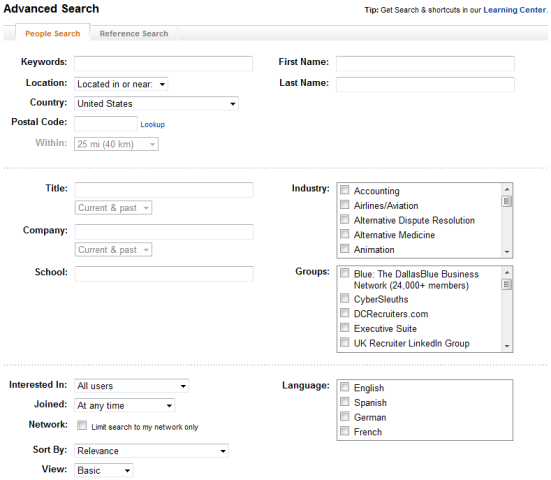
 LinkedIn has made some great changes to their advanced search interface recently, giving users the ability to take more control over the precision of their searches. I was specifically excited to see more options for location searching (10 mile – 100 mile radius), and the ability to search for current and/or past employers.
I was exploring LinkedIn’s site the other day and came across a chart buried at the bottom of the LinkedIn Learning Center page, and I was intrigued by the possibility of “hand coding” searches by entering LinkedIn’s advanced search operators directly into the “people search” search bar.
Here is the chart I found:
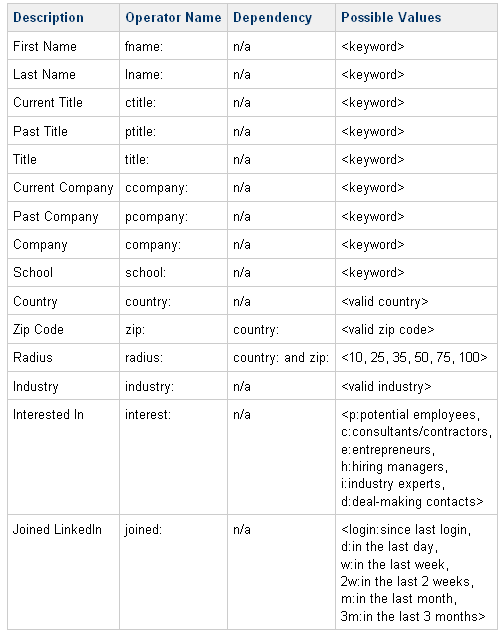
You can see that you can “hand code” searches using the above advanced operators and control most of the search fields/parameters that are found on the advanced search page interface, such as current company, past company, title, current title, past title, zip code radius, company, school, industry, interested in, and when people joined LinkedIn:
Location Searching
When I first experimented with the syntax for using the advanced operators for zip code radius searching, I ran into some problems and I contacted LinkedIn’s technical support for advice on how to make them work properly.
After 5 email exchanges (including links and screenshots and VERY direct/specific questions) that were comical to say the least (ignoring my question and simply telling me to use the advanced search interface, as well as not being aware of the advanced operators until I sent a screenshot), the technical support rep from LinkedIn finally concluded this: “The operators you are speaking of in our advanced people search are now provided for you in the drop down fields. These fields are provided to help narrow the search and make the process easier to understand. With the new search function inputting country: zip: and radius: is no longer acceptable.”
After not accepting this answer and continuing to tweak syntax, I am very happy to announce that you actually CAN accomplish zip code radius search using LinkedIn’s advanced operators. You’ll notice on the chart of operators that the zip: and radius: operators have dependencies – zip: is dependent on country:, and radius: is dependent on country: and zip:. For example, if you were searching for people in a 25 mile radius of Washington, DC, you could create a search like this:
country:”united states” zip:20001 radius:25
When using LinkedIn’s advanced operators, you enter them directly into the “Search People” bar at the top right of LinkedIn:

When you hit “Search,” you’ll get nearly 650,000 results of people on LinkedIn who live within 25 miles from the zip code of 20001.
If you don’t enter a radius: value, the search will still work – you’ll get a little over 922,000 results. Not sure exactly what LinkedIn is doing there, because a 35 mile radius produces about 777,000 results, and a 50 mile radius produces about 877,000 results. Testing other zip codes did not produce consistent results for me to try and guess the “hidden” radius value if you don’t enter one.
Also – it appears you can only choose the radius values of 10, 25, 35, 50, 75, and 100 miles when using the radius: operator. If you try and use a different number, like 30, LinkedIn will produce results using the closest “valid” radius value. In this case, when picking 30, I was trying to trick LinkedIn – it chose 25 instead of 35.
Combining Multiple Advanced Operators
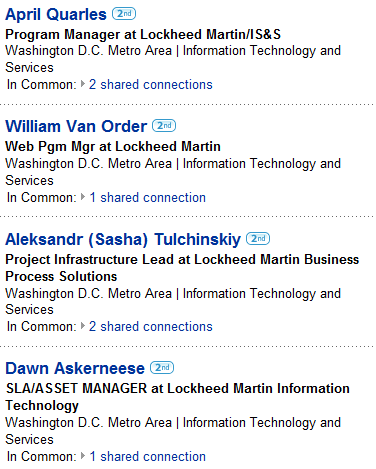
Let’s look for people who currently work for Lockheed Martin, have a current title of manager, and live within 25 miles of 20001:
ccompany:lockheed ctitle:manager country:”united states” zip:20001 radius:25
Here is a snippet of the search results:
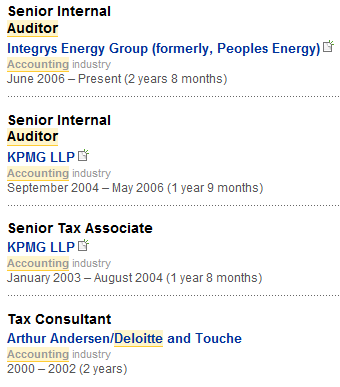
Let’s try another search. This time, we’ll look for people who have had the title of “auditor” at some point in their career (current and/or past), identify themselves as working in the accounting industry, have worked for Deloitte in the past, and live within 35 miles of 60605 in Chicago:
title:auditor industry:accounting pcompany:deloitte country:”united states” zip:60605 radius:35
As expected, the search works well. Here is a snippet of one of the results:
Combining Boolean Operators with LinkedIn’s Advanced Operators
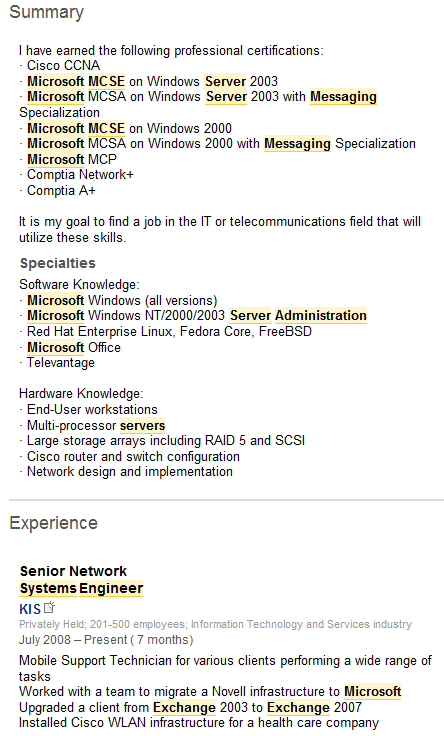
You can combine “regular” search terms and Boolean operators along with LinkedIn’s advanced operators. For example, let’s shoot for an Exchange admin/engineer with an MCSE, and a current title of engineer in a 25 mile radius of 94131 in San Francisco:
Exchange ctitle:engineer (admin OR administrator OR administration OR administer OR administered OR maintenance OR maintained) (server OR servers) (mail OR email OR messaging) (MCSE OR “Microsoft Certified Systems Engineer”) country:”united states” zip:94131 radius:25
Here is a snippet from one of the results:
Using LinkedIn’s Advanced Operators in “OR” Statements
Be careful when attempting to use some of LinkedIn’s advanced operators in OR statements. For example, here are two different ways of trying to search for people with a current title of 1 or more specific titles:
Exchange (ctitle:engineer OR ctitle:admin OR ctitle:administrator)
That syntax does not run – here is the message you get:

Taking a different approach: Exchange ctitle:(engineer OR admin OR administrator)
That synatx runs, but we can see from the results page that LinkedIn “sees” it differently that what the exact syntax would dictate:

LinkedIn appears to prefer enclosing the OR statements in quotation marks, like this:
exchange ctitle:”engineer OR admin OR administrator”
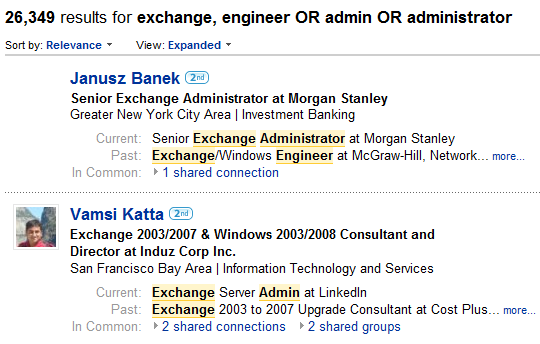
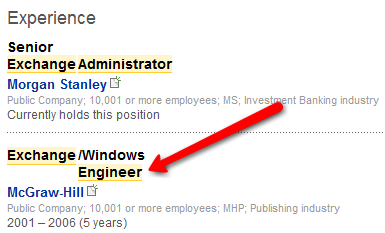
However, when you examine individual profiles, you will notice LinkedIn highlights past titles even though I specifically searched for the title terms using the current title operator of ctitle:. So using LinkedIn’s Advanced Operators in conjuction with OR operators isn’t an exact science, to say the least.
Sorting and Modifying Your Results
After you execute your “hand coded” search using LinkedIn’s advanced operators, you have the option of sorting the results by the usual values and you can also modify your search as you can if you had constructed your search using LinkedIn’s advanced search interface.
Conclusion
If you like being able to “hand code” Boolean search strings, it’s nice to know that we can effectively take advantage of nearly all of LinkedIn’s major search options/parameters (such as current/past company, current/past title, zip code radius, industry, etc.) by combining LinkedIn’s advanced operators with Boolean strings to get precisely the results we are looking for.
Although you can save searches via LinkedIn’s “save this search” feature – if you are using LinkedIn with a free account, you are limited to saving 3 searches. An added benefit of being able to craft complete search strings using LinkedIn’s advanced operators is that you can create your strings in Notepad or Word and save them for future use as well as quickly modify them (copy and paste a search, then change paramaters without having to retype the entire string).
If you enjoyed this post, I recommend you read my follow up post on how to use LinkedIn’s Advanced Search Operators as search agents.
 Does your recruiting or staffing organziation have Talent Intelligence?